

Dynamic Filtering - Solution Found to Index not Filtering Properly
RH 2017 (13.02.334) with Windows 10
So for a few months now, I've had an issue with the index not filtering correctly in our merged HTML5 help system. Through much trial and error, and through no small amount of effort, I'm sure, on Peter Grainge's part (Thank YOU Peter!), we found what was causing the problem.
Problem:
When unfiltered, all entries would be there as expected. When filtered, some entries would be excluded as expected, but others that should have been excluded weren't.
Cause:
We discovered that bolded index entries--entries that aren't linked--will show up in the index with their sub-entries visible, even if the topics for those sub-entries are marked with a topic-level filter that you're excluding.
For example, on this test index, Index 1 does get excluded when I am excluding the f_help_qdasconfigurator filter. But Index entries 2 and 3 still show up, even through their topics are marked with the same f_help_qdasconfigurator topic-level filter.
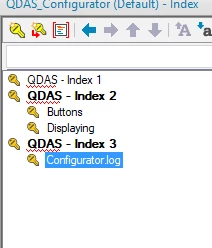
There are two solutions:
Solution 1:
Ensure that each bolded entry is linked to a topic in the help.
Solution 2:
Ensure that each bolded entry has the topic-level filter you're using for your filtering, like this:

Thanks again Peter!


 AdChoices