
Sleant
Inspiring
February 13, 2026
Question

Dynamic Title Box in Frameless

  • February 13, 2026
  • 3 replies
  • 0 views


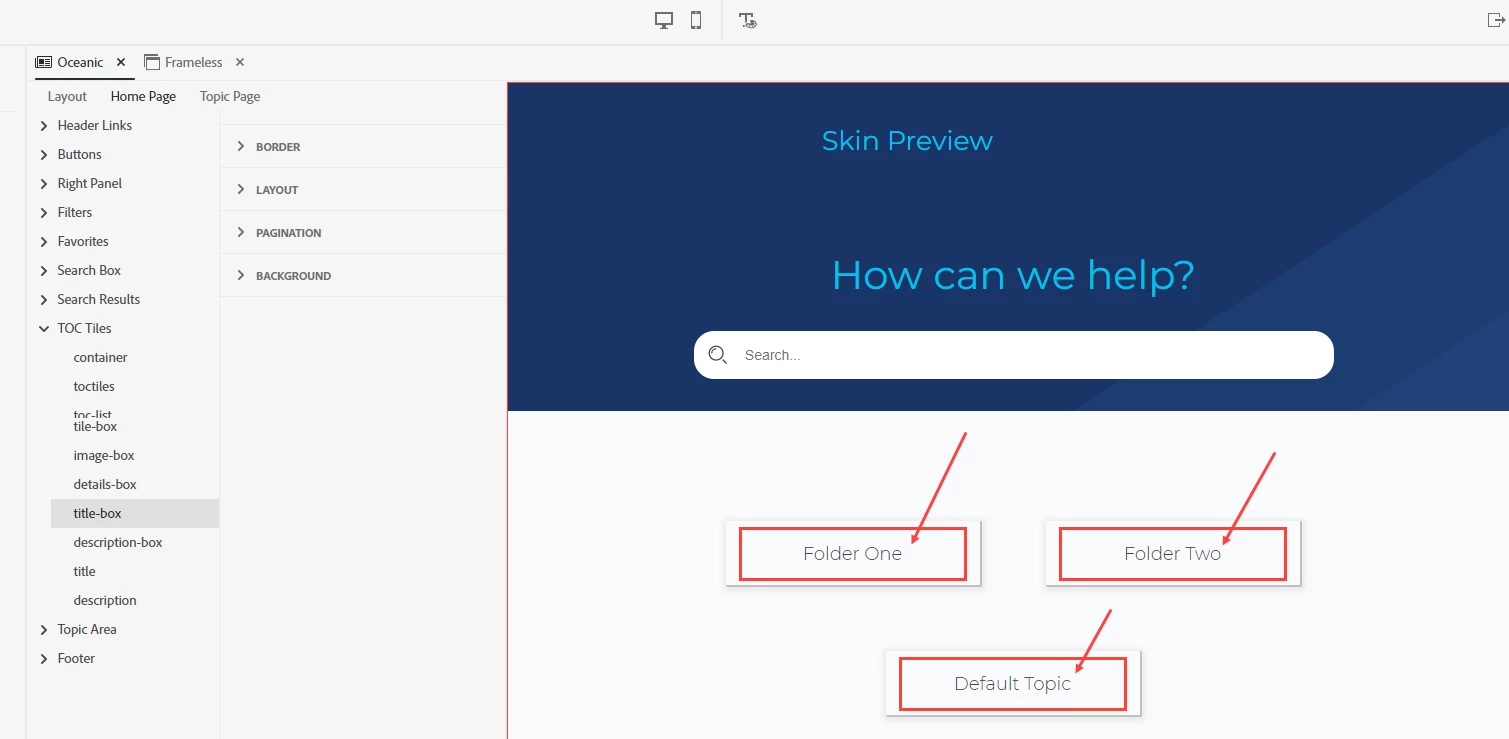
Using RH version 2022.6.34 with the Oceanic template on the Home Page setting, we notice that our Titles are longer than the default title-box width. In the screenshot below, is there a way to dynamically adjust the box size to fit the length of our Titles?

Thank you SO MUCH in advance.
    3 replies

    Peter Grainge
    Community Expert
    Community Expert
    February 13, 2026

    Turn off the Home Page here.

    The user will then go to whatever you set as the default topic in the preset.


    My site www.grainge.org includes many free Authoring and RoboHelp resources that may be of help.

    Use the menu (bottom right) to mark the Best Answer or Highlight particularly useful replies. Found the answer elsewhere? Share it here.
    Sleant
    SleantAuthor
    Inspiring
    February 13, 2026

    Both of you are heroes on this community. THANK YOU!

    Jeff_Coatsworth
    Community Expert
    Community Expert
    February 13, 2026

    Yeah, that was one of the reasons why my projects never looked good in that style of home page.

    Sleant
    SleantAuthor
    Inspiring
    February 13, 2026

    Is there a different template that is your go-to for frameless?

    Peter Grainge
    Community Expert
    Community Expert
    February 13, 2026

    As far as I can see, the answer is they cannot be changed dynamically. The applicable settings are shown below.

    You are not using an image so that leaves the details and title. The width can be changed so something specific but I cannot see any dynamic option.

    You can try Adobe Support but I think the answer will be the same. Also it’s your call but I’m thinking different widths based on the text would not look good.

    See https://helpx.adobe.com/contact/enterprise-support.other.html#robohelp for your Adobe Support options. The email link tcssup@adobe.com is recommended as it reaches a team dedicated to Technical Communication Suite products including RoboHelp.


    My site www.grainge.org includes many free Authoring and RoboHelp resources that may be of help.

    Use the menu (bottom right) to mark the Best Answer or Highlight particularly useful replies. Found the answer elsewhere? Share it here.
    Sleant
    SleantAuthor
    Inspiring
    February 13, 2026

    Love it! Thank you for showing me where the width setting is.