

Jared Hess
Legend
January 23, 2013
Question

ehlpdhtm.js script error - Object doesn't support property or method 'Activate'

  • January 23, 2013
  • 1 reply
  • 3342 views

RH 9.0.2.271

Windows 7 64-bit

This "Object doesn't support property or method 'Activate' ehlpdhtm.js error all of a sudden started popping up when I view any of the chms I build from my file system.
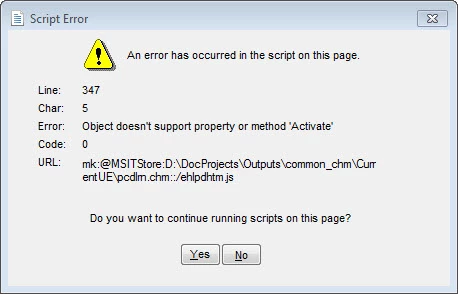
I initially through it was a 64-bit problem because if I view the chm from my file system I get the script error. But if I copy it to a 32-bit PC or run it from within RH (after it's compiled for example) or a 32-bit version of our software, it runs fine. (However, one of my co-workers tried it on her 64-bit machine and didn't receive any error.) In any case, it seems to be happening on my machine only.

Anyway, it's not on every topic, but on every one that calls the ehlpdhtm.js script with this line of code, it appears to be happening:

<script src="ehlpdhtm.js" type="text/javascript" language="JavaScript1.2"></script>

I don't think hhactivex.dll plays with this js at all, but just in case, I unregistred and re-registered that dll to no effect. I also tried explicitly adding in ehlpdhtm.js as a baggage file. Again, to no effect.

What could have changed on my system to make this start happening? And any ideas on how to fix it?

This topic has been closed for replies.

1 reply

Willam van Weelden
Inspiring
January 24, 2013

Hi,

Which DHTML effects did you apply to the pages? Only dropdowns/expandspots or did you also use a few more fancy animations and such?

Greet,

Willam

Jared Hess
Legend
January 24, 2013

Hi William. Thanks for responding. That's the strange thing. On some topics, there's no HTML effects going on. For example, take this rather simple topic:

Here's the HTML.

Everytime I refresh this topic (and nearly every single other one) in the CHM file when viewed from my file system, it gives the script error. Previewing the topic is fine. Viewing the CHM from within RH is fine.

Jared Hess
Legend
January 28, 2013

Well here's some more info I found out. If I unregister the 64-bit hhactivex.dll the script error  goes away. Of course my Glossary tab is grayed out as shown below, so that's not really an option:

Reregistering the 64-bit hhactivex.dll again shows the script errors. Plus, if I then go to my glossary it's completely empty as shown here:

If I copy this help down into a 32-bit machine everything works: the glossary has glossary terms, there's no script errors.

In short, I don't know what's going on, but the script error I'm getting is somehow related to having the 64-bit dll registered.