
Toxxyc
Inspiring
September 17, 2019
Answered

Empty space above first line in topic

  • September 17, 2019
  • 9 replies
  • 942 views

Hi guys,

I suddenly have a new issue on Robohelp 2019.  I'm using the new UI, with the Indigo skin.  I can't pinpoint when this issue started, but it seems to have been there since Update 8 already.  Work published before that doesn't seem to have that issue.


Anyway, the problem I have is that there is a blank piece of nothing above the first line in my topics now.  As an example, it used to look like this:
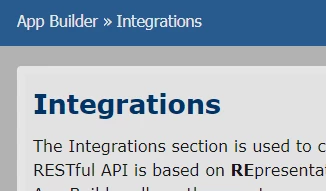
 

And now it looks like this:
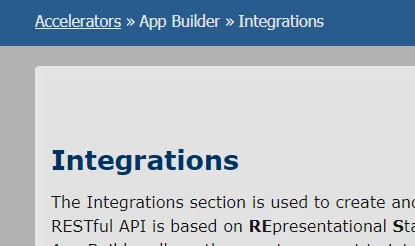
 

When I inspect the empty space, I see Robohelp has created a blank div called <div class="topic-header-shadow"></div>.  I don't know where it comes from or how to fix it.  My master page hasn't changed and there's no space above any of my topics.  It's a new issue and it's on all my topics.  If I scroll down the text on screen does occupy that space.  It looks bad.


Anyone with ideas?

This topic has been closed for replies.
Correct answer Peter Grainge

See http://www.grainge.org/pages/authoring/rh2019/rh2019.htm  for a link to Adobe's fix for this issue.


9 replies

Peter Grainge
Community Expert
Peter GraingeCommunity ExpertCorrect answer
Community Expert
October 9, 2019

See http://www.grainge.org/pages/authoring/rh2019/rh2019.htm  for a link to Adobe's fix for this issue.


Use the menu (bottom right) to mark the Best Answer or Highlight particularly useful replies. Found the answer elsewhere? Share it here.
Toxxyc
ToxxycAuthor
Inspiring
October 10, 2019
Thanks Sir, that fix did work and fixed the issue I had!
Toxxyc
ToxxycAuthor
Inspiring
October 9, 2019

OK so it seems there's a hotfix for this.  A 1.2GB hotfix, but it works, so YAY!

Community Expert
September 19, 2019

Another good tool for find and replace is TextCrawler which has a nifty preview window so you can check what your regex is going to match as you write it. You can also save your regex for later use if you need to repeat the task more than once or twice.


https://www.digitalvolcano.co.uk/textcrawler.html

stevena7433402
Participant
September 18, 2019

Modifying topicheader.css (see Template\[skin name] folder in html output) did the trick for me as well.


In topicheader.css, I changed 

.topic-header-shadow { height: 3em; width: 100%; }

to

.topic-header-shadow { width: 100%; }.
Peter Grainge
Community Expert
Community Expert
September 18, 2019

I am not a regex expert so my method is always to create a copy of any project so that if things go bang, I can abandon the messed up project and start again.

I also use PowerGrep that shows me what it is going to change and how so that I can review things first. It's not free but worth its cost.


Use the menu (bottom right) to mark the Best Answer or Highlight particularly useful replies. Found the answer elsewhere? Share it here.
stevena7433402
Participant
September 18, 2019
Hi Peter, thanks for the tip. I didn't know PowerGrep. To track changes, I use GIT in combination with SourceTree and KDiff3, where needed. It's probably overkill, but interesting to see the impact of changes on entire RoboHelp projects and html output.
stevena7433402
Participant
September 18, 2019

I used Notepad++'s "Find in Files" functionality in combination with regular expressions to remove all those <div> tags in all files at once.


It works for my html output, but I'm not an regex expert. Can someone confirm whether or not these regular expressions are safe to use?


Find: <div class\=\"topic-header.*>(.|\n)*?<div class\=\"topic-header-shadow\"><\/div>

Replace: LEAVE EMPTY


Peter Grainge
Community Expert
Community Expert
September 17, 2019

Sorry but no means of tracking. Full updates will be announced in this forum. Interim fixes I will do my best to update threads.


Use the menu (bottom right) to mark the Best Answer or Highlight particularly useful replies. Found the answer elsewhere? Share it here.
Peter Grainge
Community Expert
Community Expert
September 17, 2019

I have since learned this is a known issue and Adobe are working on a fix. I don't know when it will be ready and released.

Meantime the only thing I can suggest is to use a text editor to remove it from one topic to confirm that works. Then, if it does, use a multi file find and replace tool on the output.


Use the menu (bottom right) to mark the Best Answer or Highlight particularly useful replies. Found the answer elsewhere? Share it here.
Toxxyc
ToxxycAuthor
Inspiring
September 17, 2019
It's a stopgap to fix the files manually, thanks Sir. I have 231 .htm files and I publish several times a day. I won't be able to run the tool each time, so I'll just leave it for now and work "through it". Thanks for the reply! Do you perhaps have an issue number or reference where I can take a look at the issue's progress?
Peter Grainge
Community Expert
Community Expert
September 17, 2019

Copy that line somewhere safe and remove it to see if that fixes the problem. I realise it's not going to fix the project but at least it will confirm the cause.

I will see if I can find out more.


Use the menu (bottom right) to mark the Best Answer or Highlight particularly useful replies. Found the answer elsewhere? Share it here.
Toxxyc
ToxxycAuthor
Inspiring
September 17, 2019
Hi Sir. That line is not in the source. It's just in the output. If I check the source code in RoboHelp, the first line in the body is my H1 heading tags. If I delete the line in the browser dev tools it fixes the issue.