


Known Participant
August 18, 2020
Question

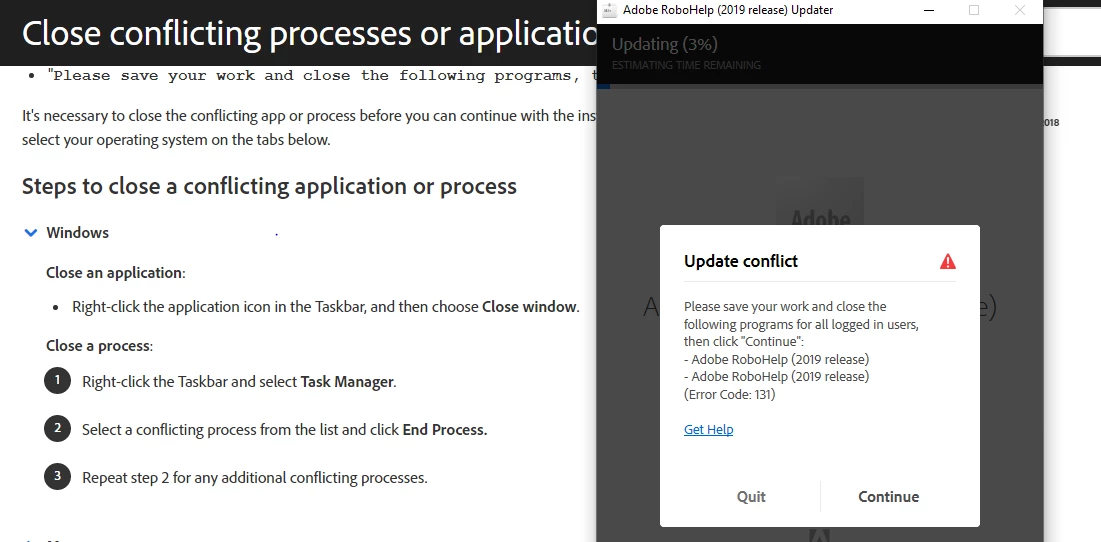
Error code 131 when updating Robohelp 2019

  • August 18, 2020
  • 6 replies
  • 610 views

Hi Team,

Am getting Error code 131 (Update Conflict Error)  while trying to update my Robohelp 2019.0.12 to the latest update which is available. Below is the screenshot of the error for your reference.
 

    This topic has been closed for replies.

    6 replies

    Community Expert
    September 6, 2023

    Please confirm you've completed the steps in Peter's post.

    Peter Grainge
    Community Expert
    Community Expert
    August 19, 2020

    BTW. You must have admin rights on the machine.


    Use menu (bottom right) to mark as Best Answer or to Highlight particularly useful replies. Found the answer elsewhere? Share it here.
    Peter Grainge
    Community Expert
    Community Expert
    August 19, 2020

    Please confirm you have followed these steps exactly after a reboot of your machine and still get the issue.


    1. Open RoboHelp 2019 and clicked Help > Updates.
    2. Started the Update process.
    3. Closed RoboHelp and then clicked Continue.


    If that does not solve it go to https://www.adobe.com/support/robohelp/downloads.html and download the update. Unzip it and make sure RoboHelp is closed. Run that installer.


    Use menu (bottom right) to mark as Best Answer or to Highlight particularly useful replies. Found the answer elsewhere? Share it here.
    Known Participant
    September 6, 2023

    I am also facing the same issue with  RH 2022.2.22. Unable to update it to the latest version..

    Known Participant
    August 19, 2020

    Yes, Closed all RH instances. Also in Task Manager

    Community Expert
    August 19, 2020

    Yes, the installer is really annoying as you have to start the update from Robohelp, then close all instances of Robohelp, otherwise the installation fails with that error.


    I've also found that sometimes RH2019 New UI gets a bit confused and leaves processes running in the background. So if you did close all RH instances and still get the error, you might need to go to Task Manager and end the rogue tasks.

    Peter Grainge
    Community Expert
    Community Expert
    August 18, 2020

    Did you try closing RoboHelp and then clicking Continue?


    Use menu (bottom right) to mark as Best Answer or to Highlight particularly useful replies. Found the answer elsewhere? Share it here.