
onthehour
Participant
February 24, 2016
Question

Error: "Publishing Aborted...Encountered Sharing Violation..."

  • February 24, 2016
  • 1 reply
  • 503 views

Hello! I'm using RoboHelp 9, attempting to publish a project as WebHelp Pro from my local drive to a shared drive. It worked once, but is now giving me a strange error (which I've seen previousl):
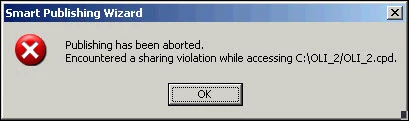
I've just rebooted and am running no other instances of RoboHelp, nor can I think of any reason the .cpd file is being accessed by another program. I have confirmed that the .cpd is in the source folder. What am I missing? What am I doing wrong?!

Thanks in advance.

This topic has been closed for replies.

1 reply

Jeff_Coatsworth
Community Expert
Community Expert
February 24, 2016

Well first off are you using RH Server to host this content? If not, then you’re wasting your time with producing WebHelp Pro – it’s specially formulated to work with RH Server.

What do you mean that you have confirmed the .cpd is in the source folder? Are you running some sort of source control? If so, I don’t believe that the .cpd is supposed to be subject to that – it should remain on the local drive.

onthehour
onthehourAuthor
Participant
February 24, 2016

1. Yes, I am using RoboHelp Server.

2. Never mind. I was trying to check easy things off the list - files actually being in the source folder. I think I made things more confusing.

onthehour
onthehourAuthor
Participant
February 24, 2016

To make things weirder, I just closed the RoboHelp application, but kept the Smart Publishing Wizard open. I then published, and did not get the error. So it looks like Robo is accessing the .cpd and is conflicting with actually publishing?!