
Error trying to generate custom layouts from command line
I have project with about 150 topics. The projects outputs 6 different sub-projects into different folders, and each sub-project is defined by its own TOC and Layout on the Singe Source Layout pod. Each custom layout in the pod has its own name: S1 - S-3 and T1 - T3. Everything works fine and dandy when I use batch generate to compile all 6 version from the Single Source Layout pod. However, I can't seem to successfully generate any of my custom layouts from the command line:
For example, I enter:
RHCL "C:\Edvation\Magnolia\Edvation.Magnolia\Edvation Help (Master)\Edvation Help (Master).xpj" -l S1
and it then tells me that Layout "S1" does not exist. Yet, it then lists the existing layouts, and sure enough, S1 is right there. This happens for all of the layouts with custom names I've created. I can, however, generate the default layouts, as long as I haven't made any changes to them (e.g. if I try to generate the "Adobe Air" or "eBook" layout from the command line, that works fine.)
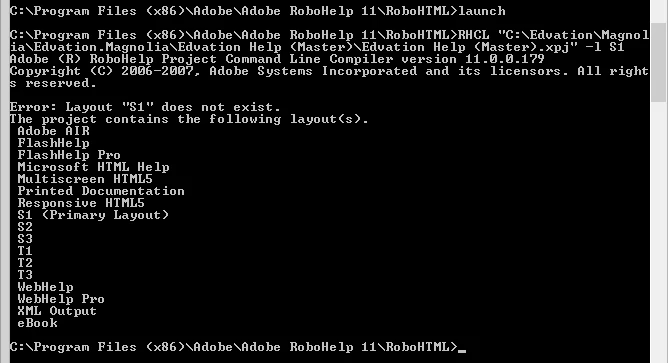
I dug around the project folder to see where these custom layouts are stored, and the S1.ssl file appears to be in order, but I did notice the rhlayout.apj data does not match the updated names of my custom layouts. Could this file be corrupted somehow? Is there somewhere else I need to add the custom-named .ssl file names so that the command line can find it?
I also tried creating a brand new project, creating a custom-named layout, and I had the same problem, so it's not just this project. I must be missing something.
Any ideas? Thanks!
I'm using RH 11.0.1.235


 AdChoices