Known Participant
September 22, 2015
Answered

Error upgrading from RH9 to RH11

  • September 22, 2015
  • 1 reply
  • 784 views

I have RH9 projects under version control (TFS) that I need to upgrade to RH11. All projects work without error in RH 9, however when attempting to upgrade I get the following mindboggling errors below:

  1. I open the RH9 project
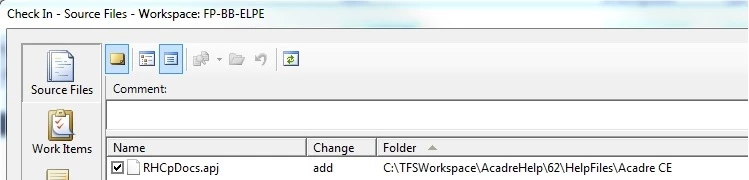
  2. Say yes to to adding this

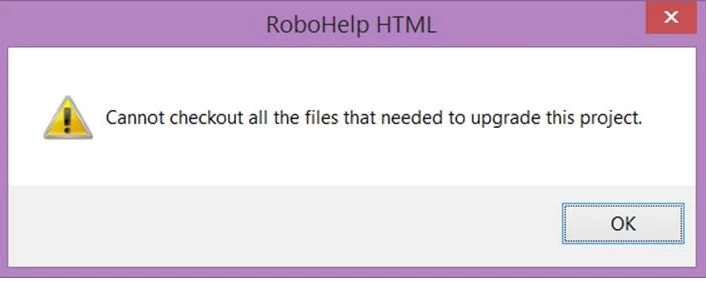
  3. Then I get

  4. Apparently RH11 needs files that were not present in RH9 (or necessary?)

What on earth do I do now??

This topic has been closed for replies.
Correct answer LykkeErik

Great Rick!

However stamina is not always enough. Yesterday I sent one of my RH11 projects to Adobe for analysis. The verdict is back for a Windows 7 environment. This has no problems in their environment. Windows 8.1 environment is still pending.

Regarding your suggestions, they have already been tried and with the same result as the first one.

My company's IT department suspects a faulty Windows viewer or Windows 8.1 installation and have decided to reinstall my laptop. I'll get back with the end result

Cheers,

Erik (at the wrong end of the stick in Copenhagen)


Back again and this time with a flawless installation. My brand new top-of-the-line Lenovo tablet was stripped and reinstalled. The culprit seems to have been the OS installation (Windows 8.1). Though no smoking gun was found!

Now everything works as it should. RH11 is up an running and all upgraded RH9 Projects are running.

Thanks to everyone for their advice on the rocky road to a solution

Cheers,

Erik

 

1 reply

ErikLykkeAuthor
Known Participant
September 22, 2015

--continued:

After trying a couple of times I also get the warning "Parameter is not valid" - but nothing about which parameter??

HELP

ErikLykkeAuthor
Known Participant
September 24, 2015

This upgrade has been far from smooth!

Lessons learned:

  1. Smaller RH9 Projects scratched through by checking out all files in TFS (several times) and adding new files (several times), continously ignoring the previously mentioned warnings.
  2. More complex Projects the approach above did not Work. In the end I had to delete cpu and xpj and use hhp to initiate the project (rebuild) before an upgrade was possible.

Issues after upgrading:

  1. hyperlinks in the Projects CSS were stripped
  2. Masterpages greyed out and no longer accessible

Wishing list:

On my wish list from the Robohelp team:

  1. is a detailed upgrade do's and don't's and especially more attention to projects under source control
  2. Words of wisdom not to follow is when Adobe support say you should disengage the project prior ro upgrading. If you do that your history in TFS goes down the drain

Good luck to the next poor soul attempting to upgrade

Willam van Weelden
Inspiring
September 24, 2015

Hi Erik,

1. There isn't much to say about upgrading. Just open and RH do it's thing. Optionally, you can check out the project in Visual Studio, remove the CPD and then open the project.

2. Absolutely true. If you want to disconnect and retain your history: October 2004 - Banishing the sorcery

Do you still get the 'Parameter not valid' error? If not, did you find a way to solve it? That error message has been bugging me for quite a while now and I have not found a solution as of yet.