
Known Participant
June 13, 2017
Question

Error when trying to move topics within Project Manager RH15

  • June 13, 2017
  • 2 replies
  • 803 views

I have a project where I need the topics to be at the root in the Project Manager.  Currently there are a few  folders that some topics reside under.  See image.
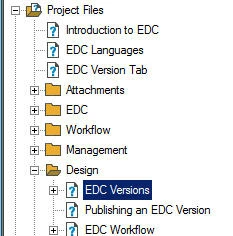
When I try to move them to the root Project Files I get the error below:
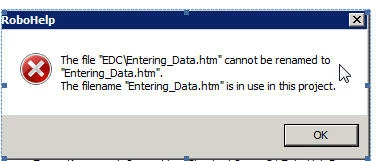
Can someone help me to  know what I am doing wrong?

Thank you in advance for your help.

Stella

This topic has been closed for replies.

2 replies

Captiv8r
Legend
June 14, 2017

Actually, in looking more closely at the dialog, I see a backslash in the file name. Can you confirm this? Perhaps the solution is as simple as choosing to rename the file and just omit the backslash.

Cheers... Rick

Inspiring
June 13, 2017

I don't understand your screenshots. The first screenshot shows the "EDC Versions" topic selected under the Design folder, but the second error message shows the Entering_Data.htm file that is in the EDC folder. Did you get the error message when you tried to move the EDC Versions topic to the root folder?

Paul Hanson

Captiv8r
Legend
June 14, 2017

It's possible that the topic title is actually different than the topic file name.

Known Participant
June 14, 2017

They are at times. It relates to the name developer gave the page so he can call it for context sensitive help. The topic titles are often changed to make more sense to the user and to match the actual system. So do they need to be the same in order to move them?