
Inspiring
December 3, 2020
Answered

Expand/Collapse button not working

  • December 3, 2020
  • 3 replies
  • 1033 views

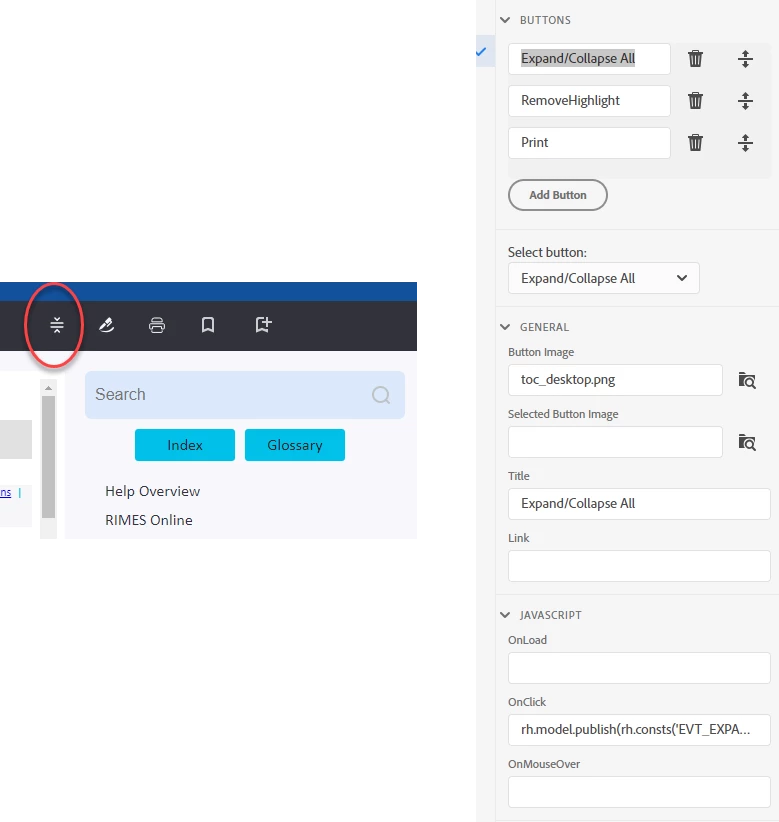
In RH's Skin-Layout tab is ‘Custom Buttons’. They show the first custom button as Expand/Collapse with a script is in place in the OnClick field; yet in my output nothing happens when you click this button. The only other open field on the tab is ‘Link’; do I need to fill in that field to get the button to work or is there some step I am missing? Is this a known bug they are working on? I did Help-Update and it said my progam was fully up to date. Image attached.
    This topic has been closed for replies.
    Correct answer Peter Grainge

    What I am saying is that the icon is for topics that have dropdown or expanding text so that users don't have to click each one. Thus no dropdowns or expanding text in a topic then you are not going to see anything happen.

    ________________________________________________________
    See www.grainge.org for free Authoring and RoboHelp Information

    3 replies

    Peter Grainge
    Community Expert
    Peter GraingeCommunity ExpertCorrect answer
    Community Expert
    December 4, 2020

    What I am saying is that the icon is for topics that have dropdown or expanding text so that users don't have to click each one. Thus no dropdowns or expanding text in a topic then you are not going to see anything happen.

    ________________________________________________________
    See www.grainge.org for free Authoring and RoboHelp Information

    Use the menu (bottom right) to mark the Best Answer or Highlight particularly useful replies. Found the answer elsewhere? Share it here.
    COHAN3Author
    Inspiring
    December 4, 2020

    Oh, sorry, I completely misunderstood the meaning of that icon, thanx for setting me right on the issue. Now that I know what it does I will eliminate the button as I dont really need that. Thanks for your help Peter, I appreciate it.

    Regards,

    Bill


    Peter Grainge
    Community Expert
    Community Expert
    December 3, 2020

    Because 2020 is an upgrade, not an update. If you have a subscription you can download and use it. If you have a perpetual licence for 2019 then you need to take out a subscription.


    You haven't answered my question. In the output are there any dropdowns in the topic when you click the Expand icon.


    Use the menu (bottom right) to mark the Best Answer or Highlight particularly useful replies. Found the answer elsewhere? Share it here.
    COHAN3Author
    Inspiring
    December 3, 2020

    Hi Peter, no, no dropdowns, nothing happens when i click the icon in the output, although the adjacent icons all work (print, favorites, browse). I assume there is not supposed to be a dropdown because the icon is supposed collapse/uncollapse the right aligned TOC only, not sure why there would be a dropdown for that task.

    Peter Grainge
    Community Expert
    Community Expert
    December 3, 2020
    1. 2019 or 2020?
    2. Which skin?
    3. Does the topic have dropdowns or expanding text?


    Use the menu (bottom right) to mark the Best Answer or Highlight particularly useful replies. Found the answer elsewhere? Share it here.
    COHAN3Author
    Inspiring
    December 3, 2020

    There's a 2020 version of RH? My version is 2019.0.14. When I click the Updates option it says I am fully up to date; why doesn't it update to the 2020 version? The skin I am using is called Indigo and the 'OnClick' script is:  rh.model.publish(rh.consts('EVT_EXPAND_COLLAPSE_ALL'));return false;


    Thanks for any help you can provide.

    Regards,

    Bill