


Inspiring
Feb 20, 2020 10:56 PM UTC
Answered

Exporting help to Word or PDF does not export drop-down or expandable content

I frequently export my help content to Word so SMEs can review and edit the content. In the new RH 2019, when I export the help content to Word or PDF, any content contained in a drop-down or expandable field (and glossary terms inserted into a paragraph) is not exported into the Word doc or pdf. I need this functionality to allow easy reviewing of content for SMEs.

This topic is closed to new replies. Start a new post to keep the conversation going.
Peter Grainge
Peter GraingeCorrect answer
Community Expert
Feb 21, 2020 7:33 AM UTC

Just to add to Amber's post.


Use the menu (bottom right) to mark the Best Answer or Highlight particularly useful replies. Found the answer elsewhere? Share it here.

5 replies

Peter Grainge
Community Expert
Community Expert
Feb 28, 2020 3:38 PM UTC

Content removed as it was based on what was posted above.


Translate
Use the menu (bottom right) to mark the Best Answer or Highlight particularly useful replies. Found the answer elsewhere? Share it here.
Viky TAuthor
Inspiring
Feb 28, 2020 3:27 PM UTC

I answered the wrong question.

Translate
Viky TAuthor
Inspiring
Feb 21, 2020 5:57 PM UTC

Excellent. I had not thought to look in the pre-set for Word and PDF. Thanks much!

Translate
Peter Grainge
Community Expert
Peter GraingeCommunity ExpertCorrect answer
Community Expert
Feb 21, 2020 7:33 AM UTC

Just to add to Amber's post.


Translate
Use the menu (bottom right) to mark the Best Answer or Highlight particularly useful replies. Found the answer elsewhere? Share it here.
Community Expert
Feb 21, 2020 12:07 AM UTC

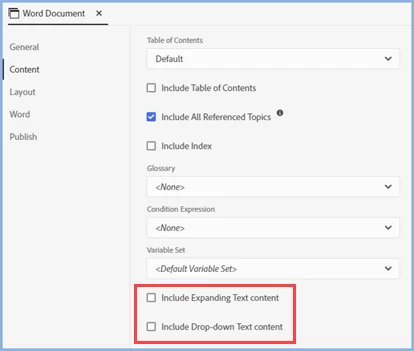
In Update 10 there was a change added to allow this I believe. In the preset make sure you select the option to inlucde dropdown content.

Translate