
Inspiring
November 6, 2023
Answered

Extra blank lines in mini TOC after upgrading from RH2020 to RH2022

  • November 6, 2023
  • 2 replies
  • 258 views

After upgrading from RH2020 to RH2022.3, the content in mini TOCs now has an extra blank line between each entry.  What used to look like this: 
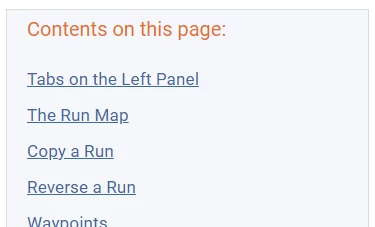
Now looks like this:
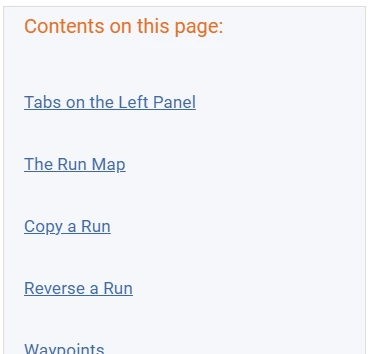
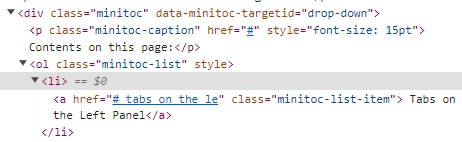
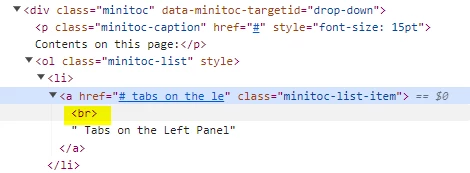
The source code shows there is a <br> where there was not one before.

Code from RH2020:
Code from RH2022:
I can't figure out how to remove the extra blank lines.

(I thought maybe it was a CSS issue, because when I open a new project and add a mini TOC, it does not have the extra blank lines, but I don't know what in the CSS could be causing this.)

This topic has been closed for replies.
Correct answer steveb72082501

I understand what you are saying, but what should I alter to get the extra <br> from being added?  This isn't just a setting like line height or padding or margin.  It's an actual "<br>" getting inserted.


UGH!  I figured out what it is doing.  I have added extra lines above my headings by putting the cursor at the beginning of the heading text and pressing ctrl-shift, which adds a <br>.  RH2022 is treating that html as if it is part of the text of the heading:


<h2><br /> Tabs on the Left Panel</h2>


I guess I should have modified the H2 style rather than doing what I did.  And I guess that's what I will have to do now.  [sigh]

2 replies

Peter Grainge
Community Expert
Community Expert
November 6, 2023

In the Styles panel look for this group of styles.


Look at the item properties. I think mini-toc list might be what you need to edit.

________________________________________________________

My site www.grainge.org includes many free Authoring and RoboHelp resources that may be of help.


Use menu (bottom right) to mark as Best Answer or to Highlight particularly useful replies. Found the answer elsewhere? Share it here.
Inspiring
November 6, 2023

There is nothing in any of the minitoc styling that seems relevant:


a.minitoc-caption {
text-decoration: none;
color: initial;
font-weight: bold;
}
p.minitoc-caption {
font-size: 15pt;
color: #E2702E;
font-family: 'Roboto', 'Arial', 'Helvetica', 'Sans-serif';
font-weight: normal;
}
ol.minitoc-list {
list-style: none;
}
a.minitoc-list-item {}
div.minitoc {
display: inline-block;
border-width: 1px;
border-style: solid;
border-color: #DCDCDC;
background-color: rgba(67, 103, 161, 0.05);
padding-left: 20px;
padding-bottom: 10px;
padding-right: 20px;
}

Peter Grainge
Community Expert
Community Expert
November 6, 2023

If I click an item in the list, it shows the style being applied, mini-toc list as I indicated. Try editing that.


________________________________________________________

My site www.grainge.org includes many free Authoring and RoboHelp resources that may be of help.


Use menu (bottom right) to mark as Best Answer or to Highlight particularly useful replies. Found the answer elsewhere? Share it here.
Jeff_Coatsworth
Community Expert
Community Expert
November 6, 2023

Must be a conversion issue - I would do a Find & Replace on the offending code.

Inspiring
November 6, 2023

The mini TOC content is generated when the code is output; it's not static code I can fix.