
Inspiring
April 26, 2016
Answered

Extra row on toolbar

  • April 26, 2016
  • 1 reply
  • 393 views

Hi all,

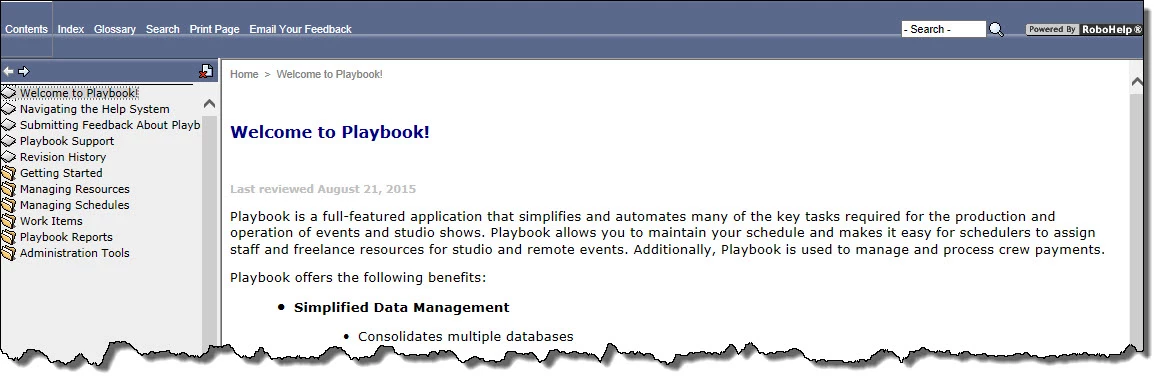
Shown below is a screen shot of the help for a project of mine.  As you can see, it looks like there is an extra blank row between the row containing the toolbar buttons and the TOC.  If I click on one of the toolbar buttons the button appears to be as tall as the 2 rows (I have the Contents button selected in the screen shot.)  I don't see a way in the skin editor to change this.  Any thoughts on what's wrong or how to fix it?  This is webhelp created with RH 11.

Thanks in advance for any help.

Diane
This topic has been closed for replies.
Correct answer Captiv8r

Hi there

I note that there is an additional Toolbar button for emailing feedback. My guess here is that it may be related to that button. Try turning it off in the SSL Recipe and see if the toolbar normalizes. If so, it would seem it's related to that additional button. But if not, something might be going on with the skin itself.

Cheers... Rick

1 reply

Captiv8r
Captiv8rCorrect answer
Legend
April 26, 2016

Hi there

I note that there is an additional Toolbar button for emailing feedback. My guess here is that it may be related to that button. Try turning it off in the SSL Recipe and see if the toolbar normalizes. If so, it would seem it's related to that additional button. But if not, something might be going on with the skin itself.

Cheers... Rick

dlenglandAuthor
Inspiring
April 26, 2016

That additional button was the culprit.  I haven't had a chance to see why but at least I know where to look now.  As always, THANK YOU