
Participating Frequently
June 15, 2012
Question

Extra space before start of a list.

  • June 15, 2012
  • 7 replies
  • 1331 views

When I am generating the printed documentation for my project through RH 9, the chm is alright but there is space gap between the start of a list in the word output.

I have attached two screenshots to make things more clear (icons in the top right of the images are just for reference).
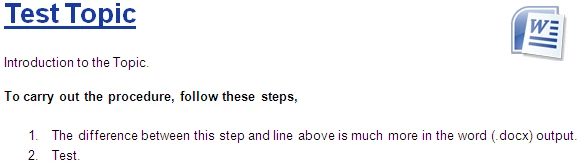
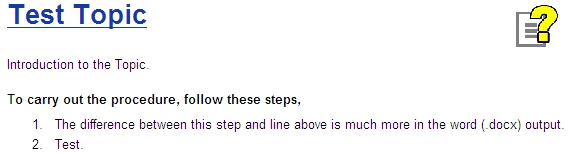
The style used for the list in RH is Lists that is used by default. I have not edited the style. But, the style in the word document is Normal for the list. I am using the project's style sheet to generate the printed documentation. The style for the second line (To carry out the procedure, follow these steps,) is different from the introduction line. I tried to alter this style in the word output but to no effect.

I think I am missing some step while generating the PD that is resulting in this space difference. Thanks for providing any solutions.

This topic is closed to new replies. Start a new post to keep the conversation going.

7 replies

Peter Grainge
Community Expert
Community Expert
June 23, 2012

In Word turn on the paragraph markers. Is the extra space truly more space of is an extra paragraph being added?

Also in Word select the line "To carry out..." and note the shading. Is it going way below the text? Do the same with the first line of the list. Is it going way above.

Not a solution but it may point you to the cause and help you find a solution.


See www.grainge.org for RoboHelp and Authoring tips

@petergrainge

Use the menu (bottom right) to mark the Best Answer or Highlight particularly useful replies. Found the answer elsewhere? Share it here.
Participating Frequently
June 25, 2012

When I select the first line in the list in word, the shaded part is going way above the text. I tried reducing the Before space for the Normal style in RH, but, it did not help.

Peter Grainge
Community Expert
Community Expert
July 6, 2012

I think the issue here is that in Rh your OL tag has space above it and that is not getting carried over to Word.

When you generate the Word document, are you mapping to a Word template or using the project CSS? I'm guessing the former.

If you cannot fix it any other way, a kludge would be to use a special style for the text above the list. In Word, add that style to the template and apply some extra space below.


See www.grainge.org for RoboHelp and Authoring tips

@petergrainge

Use the menu (bottom right) to mark the Best Answer or Highlight particularly useful replies. Found the answer elsewhere? Share it here.