


Inspiring
July 8, 2022
Question

Failed to generate frameless output

  • July 8, 2022
  • 3 replies
  • 308 views

 Hello, 

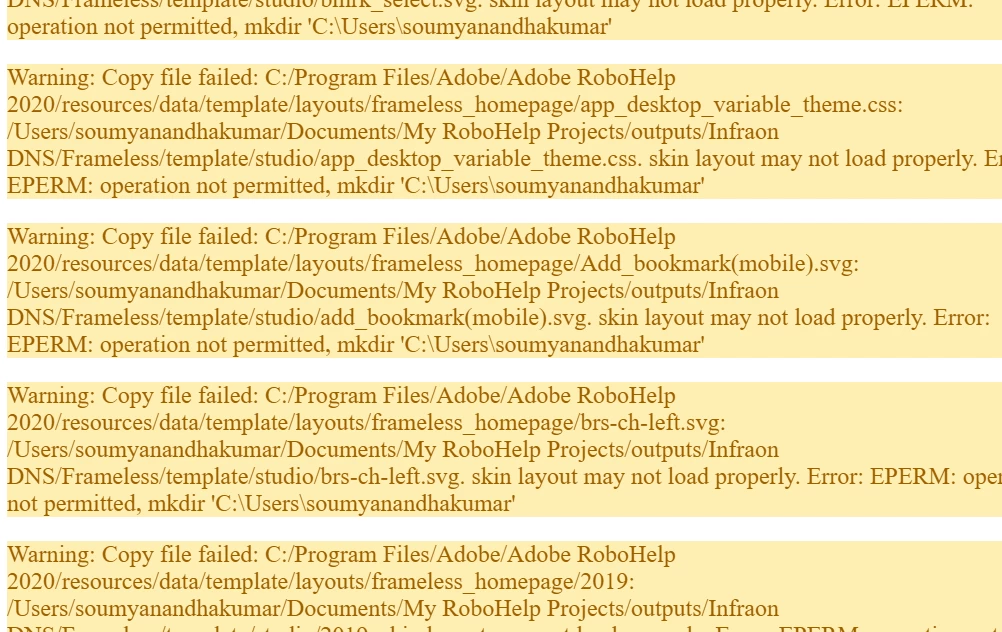
         I am using the Robohelp 2020.8.34. When I sent for frameless generate. It failed. I checked to log files. It shows errors to load the skin layout. Do you know how to fix this? See the image I have got errors. 
    This topic has been closed for replies.

    3 replies

    Peter Grainge
    Community Expert
    Community Expert
    July 11, 2022

    From your image it looks like you are working on a project that is either in your Program Files folder or has links to files that are there.


    Either are big NO NOs. Projects and assets must be outside Program Files. It's a Windows security thing.

    ________________________________________________________

    My site www.grainge.org includes many free Authoring and RoboHelp resources that may be of help.


    Use the menu (bottom right) to mark the Best Answer or Highlight particularly useful replies. Found the answer elsewhere? Share it here.
    Community Expert
    July 10, 2022

    Usually it's Word output that doesn't work and the others do. I think this is the first time I've heard of the other way around. 😄


    Where are your projects located and what is the output directory? 

    Inspiring
    July 11, 2022

    Hi,

        I have one more robohelp file that has no images. That file I am able to generate frameless output. So, does frameless accept any particular image file to give its output?

    Community Expert
    July 8, 2022

    Have you previously generated successfully? If yes, has anything changed since the last time you generated (eg. software updates, antivirus, etc)?


    Do you get the same problem using one of the sample projects? You should find the sample projects in your Documents/My Robohelp Projects folder. If they aren't there, you can copy a version from the Robohelp installation folder in Program Files. DO NOT try to open the samples from the Program Files location as security features on that folder will prevent it from working.

    Inspiring
    July 8, 2022

    Generated first time, not successful for sample, responsive, pdf, etc. Only word output works.