
Inspiring
January 11, 2022
Answered

Failed to Generate Word output (RH 2020)

  • January 11, 2022
  • 34 replies
  • 1951 views

Hi Everyone.


In RH 2020.6.76, when I try to generate Word output, I get the simple error message:  "Failed to generate [name of TOC]"


I've read a bunch of forum threads, leading me to these troubleshooting efforts:

  • Sample project -- output successful
  • Tried removing my CSS -- output fails
  • Tried setting all style mappings to "Use Word default" -- output fails
  • Tried setting Master Page to "none" -- output fails
  • Tried outputting a different TOC to Word -- output fails
  • Tried outputting an older version of this project -- output successful


NOTE:  There's one major difference between my current project and the older version:  when creating my current project, Adobe Tech Support had me create a new project and import all my topics from the older version. (We were troubleshooting an issue with the Online Review feature.)


Here's what I see when right-clicking the output preset:
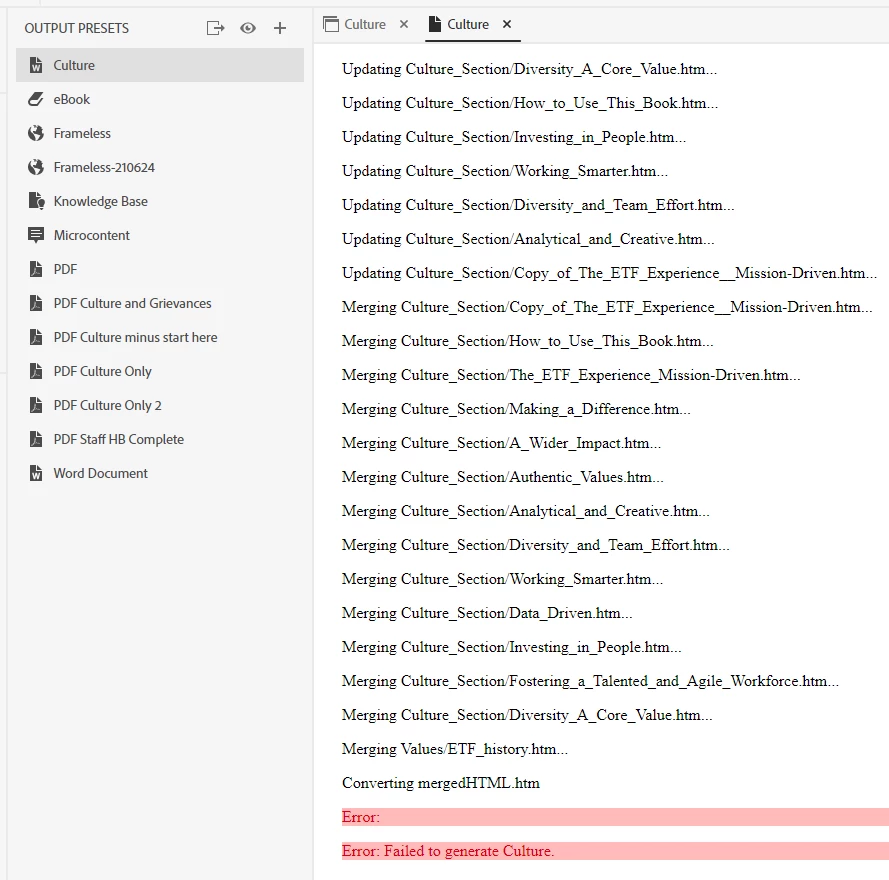


Any advice for me?


Thank you!
    This topic has been closed for replies.
    Correct answer martinl83372021

    Okay, trying again. (And I apologize that I've confused matters by introducing screenshots of my REAL PROJECT.


    Going back to the TEST PROJECT that I've sent you, I've undone the deletion. 


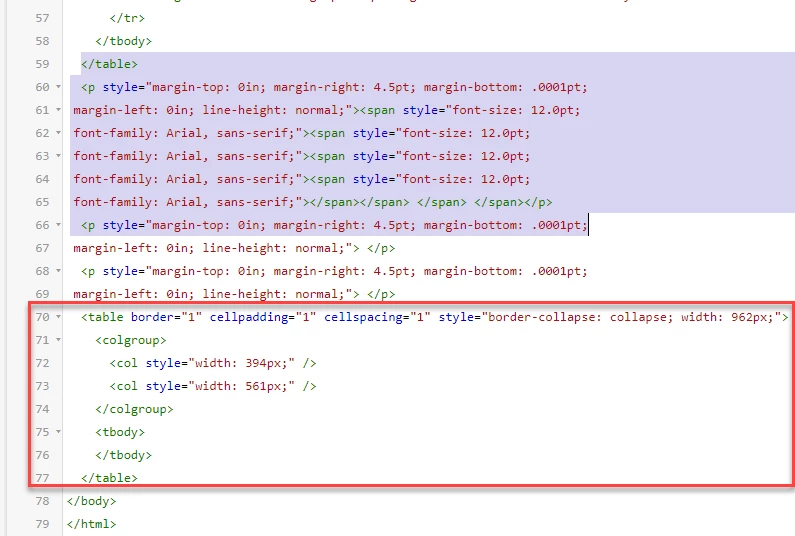
    Your initial message about the code said to "delete the empty table in lines 59 to 66." That's what's selected in this screenshot: 


    But if I understand what you're saying now, I should instead delete what's in the red box?  


    34 replies

    Peter Grainge
    Community Expert
    Community Expert
    January 13, 2022

    One more thought. You are generating to the same local drive as your project.

    ________________________________________________________
    My site www.grainge.org includes many free Authoring and RoboHelp resources that may be of help.

    Use the menu (bottom right) to mark the Best Answer or Highlight particularly useful replies. Found the answer elsewhere? Share it here.
    Peter Grainge
    Community Expert
    Community Expert
    January 13, 2022

    Send me your test project. See the Contact page on my site and send the project as instructed there. Do make sure you include a link to this thread and please do not email the project direct.

    ________________________________________________________
    My site www.grainge.org includes many free Authoring and RoboHelp resources that may be of help.

    Use the menu (bottom right) to mark the Best Answer or Highlight particularly useful replies. Found the answer elsewhere? Share it here.
    Inspiring
    January 13, 2022

    Hi Amber and Peter.


    Thanks for the troubleshooting ideas. I've done the following:


    • Shorter paths for both the project files and the output. Still failed.
    • Imported my CSS into test project and switch to it. Still failed.
    • Switched to default CSS. Still failed.
    • Right-clicked the preset to view the log. (See screenshot below.) But I don't know how to read the log.  
      • Also see screenshot of log from my proper project. (See 1st post, above.)


    Thank you!


    Community Expert
    January 12, 2022

    A couple of other things to try using your test project.


    • Move your test project to a short path like c:\doc_source
    • Generate to a very short path like c:\doc_output 
    • Check the topic name, project name and path only contain letters, numbers, dash and underscore characters (and the single dot before the file extension where applicable)

    I don't think they're likely to be causing the problem in this case, but doesn't hurt to double check.


    Otherwise I think Peter's suggestion of checking the topic source code for mso or other funny things is the next step.


    Peter Grainge
    Community Expert
    Community Expert
    January 12, 2022

    Did you import your CSS or change to the default? The latter is worth a try.


    Beyond that and with everything else you have reported, it does confirm an issue with you topic. After getting the warning, I think you can right click the preset and view the log. Does that give any clues?


    Any code with MSO in it?

    ________________________________________________________
    My site www.grainge.org includes many free Authoring and RoboHelp resources that may be of help.

    Use the menu (bottom right) to mark the Best Answer or Highlight particularly useful replies. Found the answer elsewhere? Share it here.
    Inspiring
    January 12, 2022

    Hi Peter.


    I've tried the latest troubleshooting task. I'm not 100% sure I've done it correctly:

    1. Created a test project
    2. Imported the offending topic into it
    3. Created a TOC and placed the offending topic into it
    4. Tried generating output via the default output preset called "Word Document" 
    5. Error:  "Failed to generate Word document"


    Thank you.

    Inspiring
    January 11, 2022

    Excellent idea. 


    Will try it out first thing tomorrow am.


    Thanks, Peter!

    Inspiring
    January 11, 2022

    I know you're probably right, there must be a difference.

    I'll keep looking and let you know if I find something. But I'm needing to get some tangible progress going.

    Thanks for all your help, Peter!

    Peter Grainge
    Community Expert
    Community Expert
    January 11, 2022

    If it works OK but it's a kludge. There has to be a difference. 

    ________________________________________________________
    My site www.grainge.org includes many free Authoring and RoboHelp resources that may be of help.

    Use the menu (bottom right) to mark the Best Answer or Highlight particularly useful replies. Found the answer elsewhere? Share it here.
    Peter Grainge
    Community Expert
    Community Expert
    January 11, 2022

    Try importing the rogue topic into a new project.

    ________________________________________________________
    My site www.grainge.org includes many free Authoring and RoboHelp resources that may be of help.

    Use the menu (bottom right) to mark the Best Answer or Highlight particularly useful replies. Found the answer elsewhere? Share it here.
    Inspiring
    January 11, 2022

    Peter, I've found a workaround. I am able to generate PDF output. And in Acrobat Pro, exporting to MS Word works well enough for my needs.


    Unless you have a solution at this point, I think I'll just cash this in and use my workaround.


    Thank you for all the troubleshooting!