


Marc M.
Inspiring
March 25, 2021
Answered

Figure caption creates an automatic indent

  • March 25, 2021
  • 1 reply
  • 356 views

Is it normal that a picture in a content is automatically indent, as soon as a figure caption is used?
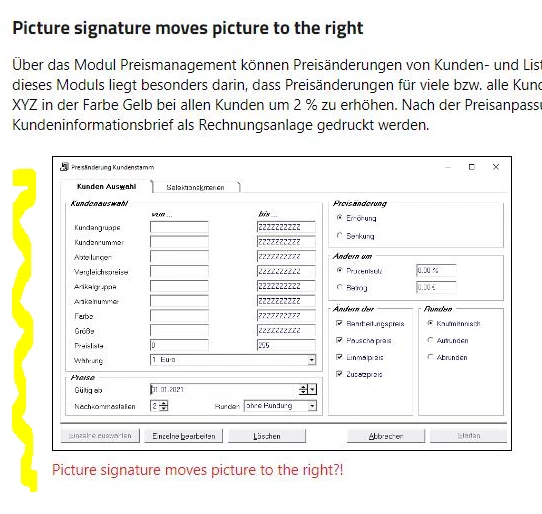

    This topic has been closed for replies.
    Correct answer Peter Grainge

    You haven't said which version of RoboHelp, that does affect answers.


    In 2020 if you look at the topic in source view you will see something like


    <figure>
    <figcaption>Caption</figcaption>
    <img align="left" src="../assets/images/imagename.png" title="Caption" />
    </figure>


    That indent looks like the default behaviour of the figure style. See HTML figure Tag (w3schools.com)


    Add the following to your CSS and that will fix it.

    figure {
    margin-left: 0pt;
    }

    ________________________________________________________
    See www.grainge.org for free Authoring and RoboHelp Information

    1 reply

    Peter Grainge
    Community Expert
    Peter GraingeCommunity ExpertCorrect answer
    Community Expert
    March 25, 2021

    You haven't said which version of RoboHelp, that does affect answers.


    In 2020 if you look at the topic in source view you will see something like


    <figure>
    <figcaption>Caption</figcaption>
    <img align="left" src="../assets/images/imagename.png" title="Caption" />
    </figure>


    That indent looks like the default behaviour of the figure style. See HTML figure Tag (w3schools.com)


    Add the following to your CSS and that will fix it.

    figure {
    margin-left: 0pt;
    }

    ________________________________________________________
    See www.grainge.org for free Authoring and RoboHelp Information

    Use the menu (bottom right) to mark the Best Answer or Highlight particularly useful replies. Found the answer elsewhere? Share it here.
