
Inspiring
October 23, 2015
Answered

Find and Replace Breaks Search RH11

  • October 23, 2015
  • 1 reply
  • 1311 views

RoboHelp 11  (11.0.4.291) / Windows 7 / 64 Bit /RoboHelp Server 9 / WebHelp Pro


Hi,

Recently I performed a Find/Replace function in all topics replacing the phrase 'multi-contractor contract' (--silly, I know--) with 'master contract'.

It seems now if I search for master contract, zero results are found.  However, if I search for 'multi-contractor', the phrase that was replaced, then it actually finds all the appropriate 'master contract' topics.

I have attempted the following:

  • Manually located all instances of the word 'master' and re-typed it - somehow thinking this would really force the system to recognize the word.
  • Performed another find/replace function to replace 'master' with 'master' - again thinking that it would somehow override the system to recognize the word 'master'.
  • Generated a new WebHelp Pro layout.
  • Created new master page for all topics.
  • Published with Replace All option set.
  • One more thing, when I view locally, the search for 'master' works - it only breaks when I publish it.

Any suggestions?

Thanks in advance.

Regards,

Julie
This topic has been closed for replies.
Correct answer johndaigle

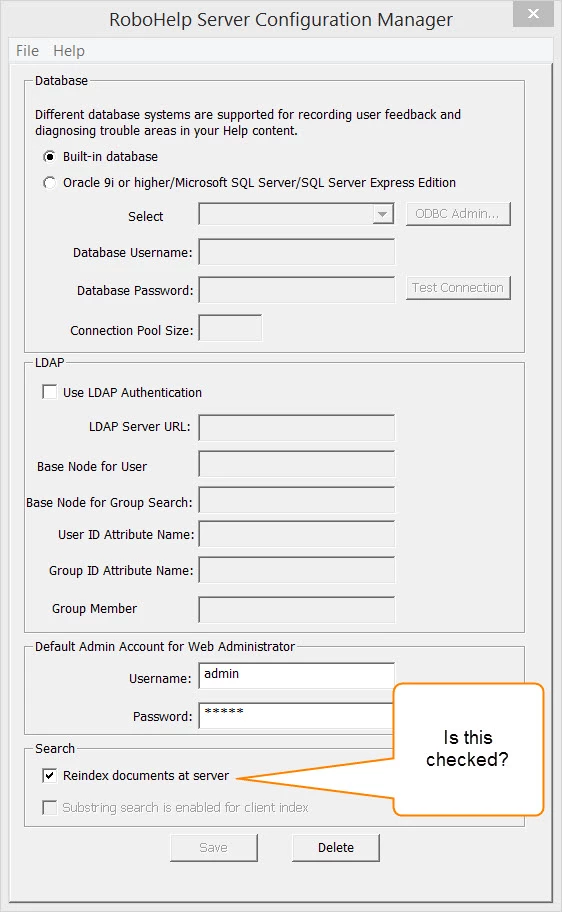
Hmm. It looks like you are using Client Side search indexing instead of the default installation. When first installed on the web server, there is an application called Configuration Manager (Unless you are allow to remote desktop onto the server, you will not be able to see this on your computer because it is installed on the server machine's desktop). Ask your web administrator to open this application and see if the "Reindex documents on server" is checked as shown below. When it is, you will see that setting available from the your Web Admin portal.

Important: Is this a new installation? Did the search work previously? Has the admin installed the RoboHelp Server Update 9.0.1 "patch" installed?

If the update does not help, it would probably be best to call Adobe Tech Support and ask for your request to be escalated to a tech support person who is knowledgeable with RoboHelp Server. Be sure to have info ready regarding the Server OS and version and Database type and version, etc.

If you still have difficulties, you may email me at the address in my forum profile.

John Daigle

Adobe Certified RoboHelp and Captivate Instructor

Evergreen, Colorado

www.showmethedemo.com

1 reply

johndaigle
Legend
October 24, 2015

Hi, Julie

First, the reason it works when you view locally is because there is a "locally" generated search index created. That's what you see when you click the View Result button after generating a fresh batch. This is called "client-side" search (because your RoboHelp authoring app is the client). This is what is used for plain WebHelp. When your content is published to the RoboHelp Server, there is a different search engine technology which takes over. This "server-side" search engine re-indexes the content with the newly published project. A couple of things may be happening to cause a delay in seeing the refreshed content.

  • Your particular server setup may be set to re-index at a certain time of day (often midnight) when there is less traffic on the server. Your admin can adjust this timing.


  • Your server administrators may have setup some kind of caching arrangement on the server and this needs to be cleared out or refresh as you might do with a web browser's cache.

One thing that might fix it quickly would be to delete the project on the server and republish to make sure the latest is being delivered (of course the caching issue may defeat even this.) So I advise talking to your web administrators to get their take on what I'm suggesting. There may be something unique to your network setup that I haven't covered.

Thanks

john

John Daigle

Adobe Certified RoboHelp and Captivate Instructor

Evergreen, Colorado

www.showmethedemo.com

John DaigleAdobe Certified RoboHelp and Captivate InstructorNewport, Oregon
Inspiring
October 26, 2015

Hello John,

It seems you always pull the short straw with my goofy problems
I deleted the project and re-published but that didn't work.

The IT Ops folks re-booted the server but that didn't work.

I have entered an internal support ticket for them to look at the caching arrangement as well as the search settings.

Strangely enough, I have access to the web admin portal but only have two options in the Settings area:  Database and Moderation.

I will let you know if anything changes as a result of them looking into the caching parameters on the server itself.

Thanks,

Julie

johndaigle
johndaigleCorrect answer
Legend
October 26, 2015

Hmm. It looks like you are using Client Side search indexing instead of the default installation. When first installed on the web server, there is an application called Configuration Manager (Unless you are allow to remote desktop onto the server, you will not be able to see this on your computer because it is installed on the server machine's desktop). Ask your web administrator to open this application and see if the "Reindex documents on server" is checked as shown below. When it is, you will see that setting available from the your Web Admin portal.

Important: Is this a new installation? Did the search work previously? Has the admin installed the RoboHelp Server Update 9.0.1 "patch" installed?

If the update does not help, it would probably be best to call Adobe Tech Support and ask for your request to be escalated to a tech support person who is knowledgeable with RoboHelp Server. Be sure to have info ready regarding the Server OS and version and Database type and version, etc.

If you still have difficulties, you may email me at the address in my forum profile.

John Daigle

Adobe Certified RoboHelp and Captivate Instructor

Evergreen, Colorado

www.showmethedemo.com

John DaigleAdobe Certified RoboHelp and Captivate InstructorNewport, Oregon