


Inspiring
December 20, 2024
Answered

Find and Replace showing different search results on Mac vs Windows

  • December 20, 2024
  • 2 replies
  • 255 views

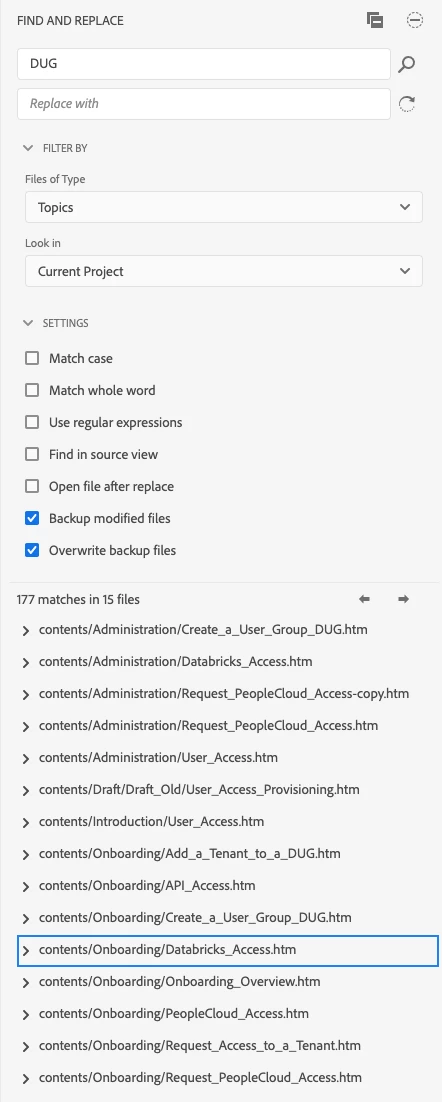
I'm on macOS 15, RoboHelp 2022.5. When I search for a particular string, I get a bunch of bogus search results—files that have been moved, renamed, or are no longer part of the project. If I try to open those links, RoboHelp prompts me to restart.


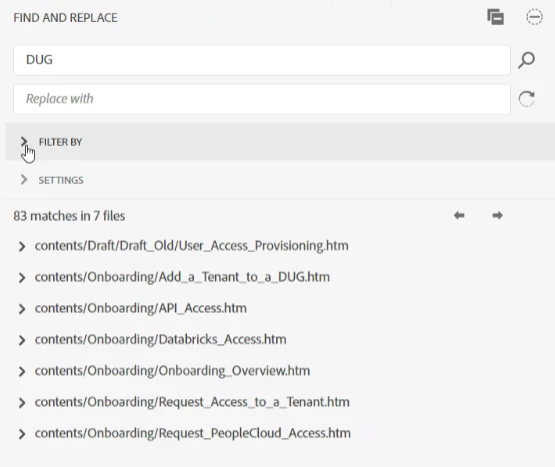
When my colleague searches using RoboHelp 2022.5 on Windows, he sees fewer, but correct, results.


I looked in Project Settings but I don't see anything that talks about reindexing. Do you have any suggestions?


macOS results (bogus):
 

Windows results (real):
    This topic has been closed for replies.
    Correct answer Peter Grainge

    The contents of the .rh folder can be deleted with the project closed 


    Have you both tried checking out fresh copies?

    ________________________________________________________
    My site www.grainge.org includes many free Authoring and RoboHelp resources that may be of help.


    2 replies

    Peter Grainge
    Community Expert
    Peter GraingeCommunity ExpertCorrect answer
    Community Expert
    December 20, 2024

    The contents of the .rh folder can be deleted with the project closed 


    Have you both tried checking out fresh copies?

    ________________________________________________________
    My site www.grainge.org includes many free Authoring and RoboHelp resources that may be of help.


    Use menu (bottom right) to mark as Best Answer or to Highlight particularly useful replies. Found the answer elsewhere? Share it here.
    ugarrdaAuthor
    Inspiring
    December 20, 2024

    Deleting .rh/.username.db.json and .rh/.username.fr.cache has resolved the issue. Thank you!

    Peter Grainge
    Community Expert
    Community Expert
    December 20, 2024

    The same project and no source control involved?

    ________________________________________________________

    My site www.grainge.org includes many free Authoring and RoboHelp resources that may be of help.


    Use menu (bottom right) to mark as Best Answer or to Highlight particularly useful replies. Found the answer elsewhere? Share it here.
    ugarrdaAuthor
    Inspiring
    December 20, 2024

    The same project. Source control is Git and Bitbucket. .rh folder is on the .gitignore list so I assume I need to delete something in there. The directory with the word "cache" in its name is awfully tempting.
