


Known Participant
Nov 3, 2014 8:42 PM UTC
Question

First Topic Missing from TOC


Windows 7 Ultimate

Robohelp V7.03

When I generate Printed Documentation to a standard Word doc. Chapter 1 and it's associated topic are missing from the TOC:
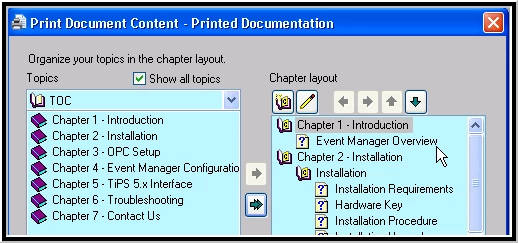
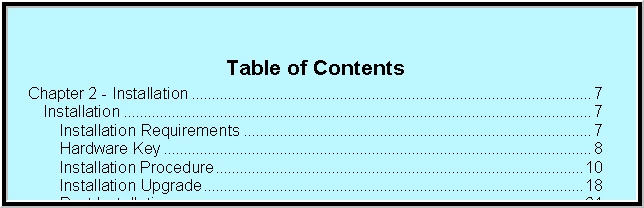
The TOC begins with Chapter 2:
For grins and giggles I generated the documentation with ONLY Chapter 1 selected to see what would happen; it shows up in the TOC just fine:
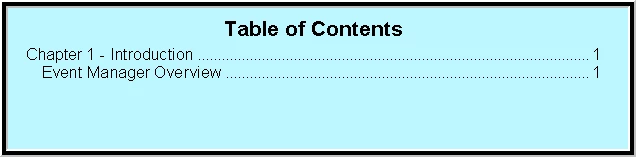
In either case, the topic is published in the body of the text just as it should be.  The only issue is that Chapter 1 doesn't make it into the TOC when I generate the whole thing.

I have no conditional Build Expressions.

The Topic properties are set for it to be included in the TOC.

There is only one TOC.

Ham-handed efforts to simply add it manually to the TOC in Word failed miserably.

Is there some sort of secret setting I am missing?  How do I get the TOC to accept Chapter 1 along with the other chapters???  I would be most grateful for any assistance.  Thanks in advance.

Scott

    This topic is closed to new replies. Start a new post to keep the conversation going.

    2 replies

    Peter Grainge
    Community Expert
    Community Expert
    Nov 9, 2014 11:49 AM UTC

    Have you tried clicking to the right of the TOC and selecting Update Field?


    See www.grainge.org for RoboHelp and Authoring tips

    @petergrainge

    Translate
    Use the menu (bottom right) to mark the Best Answer or Highlight particularly useful replies. Found the answer elsewhere? Share it here.
    Fat_MaxAuthor
    Known Participant
    Nov 11, 2014 3:44 PM UTC

    Thanks for the response, Peter.  I did indeed update the table, to no effect.

    However, I found a work-around for my issue.  In the Word 2003 document that gets produced, I am able to reconfigure the TOC to generate based on the outline rather than whatever it currently does.

    Highlight TOC >> R Click Edit Field >> Select Table of Contents Button >> Options >> Select "Outline Levels" check Box >> OK >> OK

    Select "Yes" in the message to replace the TOC, and there it is:

    I still believe there must be some arcane setting in Robohelp that will make the TOC generate properly because I have never had this issue before.

    Translate