Participating Frequently
December 9, 2020
Question

Fixed HTML errors keep returning -- help!

  • December 9, 2020
  • 15 replies
  • 487 views

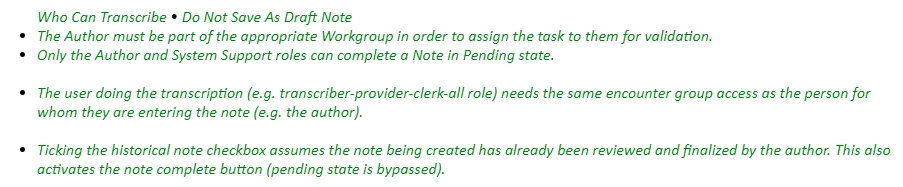
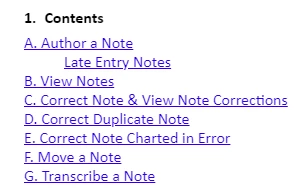
Hi there -- Robohelp formatting seems quite buggy! I've been able to fix most of the errors in the HTML. Then I save. But the errors return when I go back into the editing screen.  Examples: incorrect numbering removed in the 1st example, incorrect numbering back in 2nd example. In the 3rd example, extra spacing has been removed, in the 4th example the extra spaces are back. Does anyone know how I make these fixes permanent? The 1st one I fixed by deleting <li> before and </li> after the paragraph. The spacing I fixed by removing space between </em> and </span> and </li>.

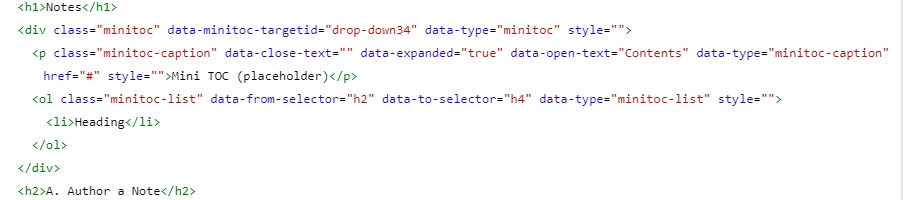
Finally, I have no idea how to remove this numbering from in front of the word contents in the mini-TOC. The HTML is pasted below. Thank you for any suggestions! Dorothy


This topic has been closed for replies.

15 replies

Peter Grainge
Community Expert
Community Expert
December 11, 2020

There were three more updates after 11 so try applying them to see if they help. Go to Help > Check for Updates.


In addition to what Amber has said...


List issues are best fixed in the CSS. Before you try any fixes create a copy of your project so that if your attempts to fix the issue backfire, you can get back to where you were.


Then select one of the errant lists and click this icon to remove any inline formatting.


That alone may fix the problem but if not go to the Styles tab and select All Styles. Click in the list that is still wrong and the style in use should be highlighted in the list of styles. Open the CSS editor and make changes there.


Are the topics created from a Word document import? If they are then they may well have brought in all sorts of Word HTML that always cause problems.

________________________________________________________
See www.grainge.org for free Authoring and RoboHelp Information

Use the menu (bottom right) to mark the Best Answer or Highlight particularly useful replies. Found the answer elsewhere? Share it here.
Community Expert
December 11, 2020

Is this a new project or one that's been upgraded from Classic? If it's upgraded, I wonder if something hasn't translated properly.


If it's upgraded you could try adding a new Indigo skin (give it a slightly different name from your existing one) and generate with that. Does it make a difference to the minitoc? If not, in your browser, right-click on the minitoc "Contents" heading and select "Inspect". The "contents" p tag should be selected and the right-hand panel should indicate which stylesheets are providing the styles - you won't be able to edit the skin stylesheets directly, but it might help pinpoint where the problem is. You can post a screenshot of the Developer Tools window if you're not sure what you're looking at.


Regarding the screenshots of the green text, I think we'd need to see a sample of some code, and also the output code to see what's going on. Certainly it's not something I've come across.

Participating Frequently
December 10, 2020

Hi -- I'm using Robohelp 2019.01.11.(I'm using a trial while I wait for my organization to buy a subscription.) 

The output is Responsive HTML5. The skin is Indigo. I was fixing the errors directly in the HTML. Thanks for the help, I really appreciate it! Dorothy


Peter Grainge
Community Expert
Community Expert
December 10, 2020

Also where are you editing? In the CSS editor or the content?


Use the menu (bottom right) to mark the Best Answer or Highlight particularly useful replies. Found the answer elsewhere? Share it here.
Community Expert
December 9, 2020

What version of Robohelp are you using. You can find the version under the Help menu or File > Help, depending on the version. Please include all numbers.


What output are you generating? And what skin are you using?