

Folder in file not showing in project
Hi, I'm new to Robohelp with a new company and so I inherited the projects from the previous person. I have a folder in my project folder that does not show up in my project. I have tried importing it back in, but then it breaks every single link. This folder was in previous projects, and it looks like every topic under that folder was marked with a conditional tag to not show up when we generated the files, but now it's just not showing at all.
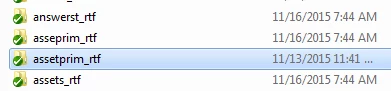
You can see the folder here in my project folder, the one in question is the highlighted one, assetprim_rtf
Down here is in Robohelp itself, and assetprim just does not show up.
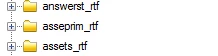
Is there any way to make this project folder show back up in the project? As I said before, I imported this, and all links were broken. When I tried to relink them, it kept telling me this page or link doesn't exist in the project (or something like that) and it wouldn't let me re-link these items back to correct links in the project. So, I'm baffled and don't really know what to do.
Any ideas as to what to do to bring this back, or maybe something I'm not doing when importing this back into the file that would not break all the links? Any help would be appreciated as I can't seem to find anything online about folders randomly going missing.


 AdChoices