


Participating Frequently
February 28, 2023
Answered

Font Color Issues

  • February 28, 2023
  • 4 replies
  • 555 views

Hi all, I need your help on why is my font color always changing, especially for hyperlink.

This happens everytime I open the project afer the last save.

For hyperlink, I used below font color"
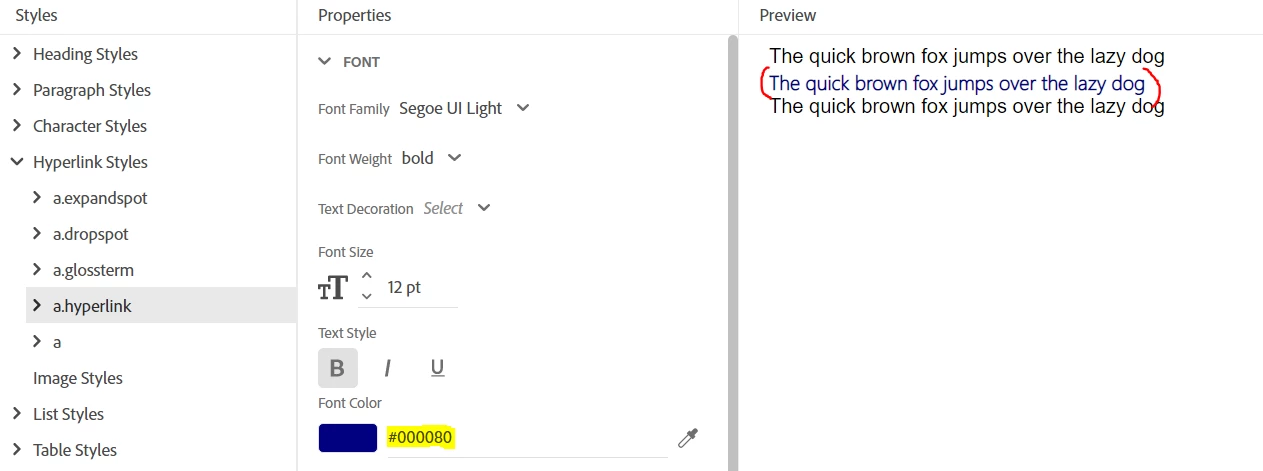


Wheh I reopen my last save project, it then changed into below color (number 1):



I have tried to re-apply the styles, the font color will go back to the right one, but then it happen again if I save and reopen my projects. 

There's also a case when the same style of hyperlink produces different colors (number 2) and number (3).

NB: this color issue happens on author mode as well as the generated output.


I also have tried to check the stylesheet, this won't fix.


Thank you in advance.

Have a nice day.


This topic has been closed for replies.
Correct answer Amebr

If you could ensure you always list the full version number of the Robohelp version you're using in every post, that will help us answer questions. They solutions can vary drastically between versions.


My first thought about the hyperlink colour is maybe you copied or imported the content from Word? This can hard code some hyperlink information in every topic. Switch to code view and check the body tag for vlink and alink attributes inside the tag, for example. Also check in the head tag for a style tag than might contain a style definition for hyperlinks. If you're not sure about html you can copy and paste from the top of the topic down to the <body tag (or even a few  lines past that if you want).

4 replies

Community Expert
March 1, 2023

You should delete the link styles if they appear in the topic source code. If you decided to change the link colour later, you would need to change every single topic. By deleting the references, the topics will use the colour defined in your stylesheet, so you'll only have to change it once. 🙂

Community Expert
February 28, 2023

Just to confirm, you deleted the alink and vlink attributes, rather than just changing the value, yes?

Participating Frequently
March 1, 2023

I changed the value (color code). What I did is I searched for the alink and turns out it was hardcoded with the wrong color code.


Participating Frequently
February 28, 2023

I am using RoboHelp Version 2020.8.34

AmebrCommunity ExpertCorrect answer
Community Expert
February 28, 2023

If you could ensure you always list the full version number of the Robohelp version you're using in every post, that will help us answer questions. They solutions can vary drastically between versions.


My first thought about the hyperlink colour is maybe you copied or imported the content from Word? This can hard code some hyperlink information in every topic. Switch to code view and check the body tag for vlink and alink attributes inside the tag, for example. Also check in the head tag for a style tag than might contain a style definition for hyperlinks. If you're not sure about html you can copy and paste from the top of the topic down to the <body tag (or even a few  lines past that if you want).

Participating Frequently
February 28, 2023

Hi Amebr, I am using Robohelp Version 2020.8.34.


Thank you for the suggestion will try it right away.