


Known Participant
July 1, 2024
Question

Font colors in skin change for mobile and tablet

  • July 1, 2024
  • 4 replies
  • 321 views

RoboHelp 2022.3.93

I am making a new skin file for HTML5 based on a previous one. 

When I setup all the font colors on desktop version of the skin, all the colors look right on the fonts.

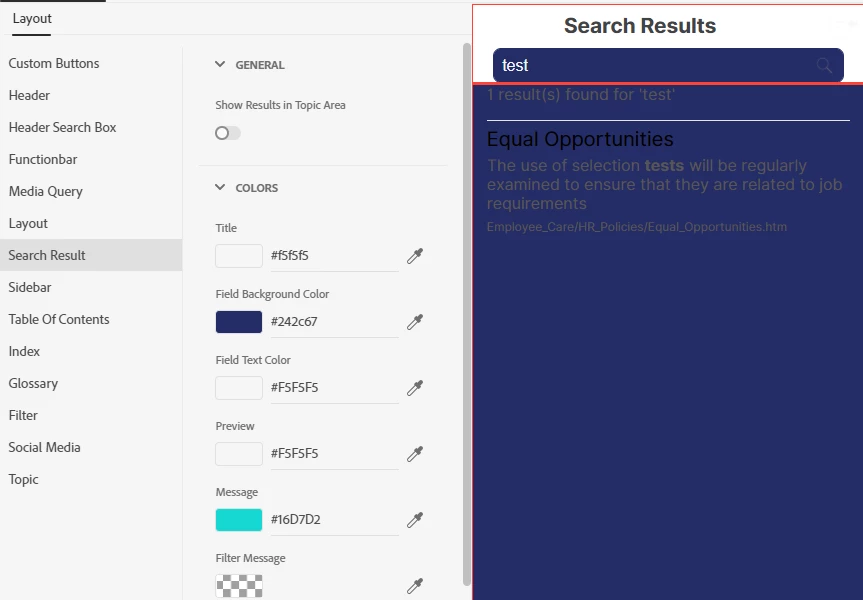
When I go to the Tablet and Mobile versions, the colors are entered correctly on the skin fields, but when I generate, the Tablet and Mobile colors change. Dekstop still looks right.

If I view the HTML5.SKN file and look for the colors, they are incorrect. If I correct them, All the skin profiles generate and display correctly. 

If I hit save again on the project, all the colors revert back to the incorrect colors in the SKN file though they still display correctly in the SKin edit fields. The preview looks wrong.

Example: Colors on the left do not match up with the colors displayed on the right: (this is mobile)
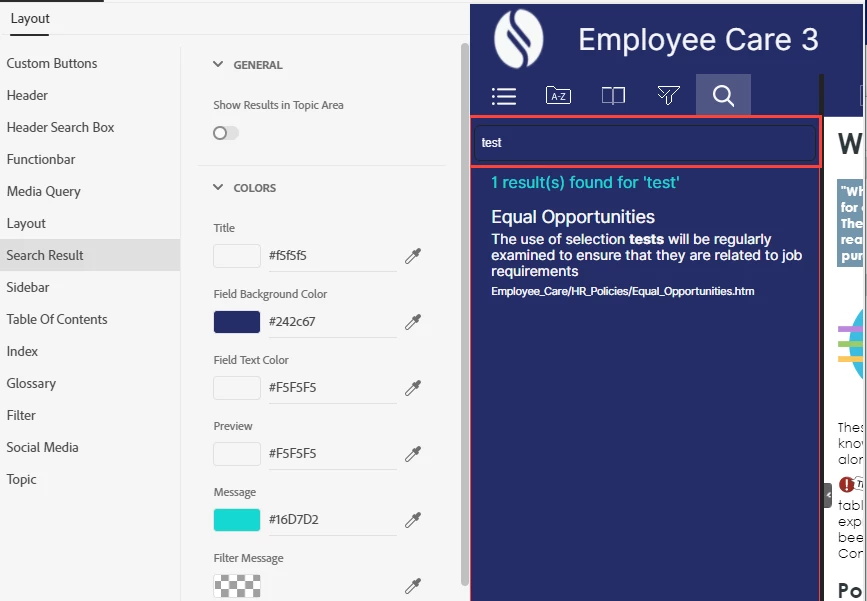
For contrast, this is Desktop and how it should look:


    This topic has been closed for replies.

    4 replies

    Peter Grainge
    Community Expert
    Community Expert
    July 3, 2024

    Your images are from the Employee Care project.


    1. Are you having the same issues in your own project? 
    2. Is it only the search results that are giving this issue? If no, where else is the problem seen?
    3. Export the skin and send it to me. See the Contact page on my site. Put the exported file in a zip file and it should be OK to attach it to an email.


    I will have a look tomorrow.

    ________________________________________________________

    My site www.grainge.org includes many free Authoring and RoboHelp resources that may be of help.


    Use menu (bottom right) to mark as Best Answer or to Highlight particularly useful replies. Found the answer elsewhere? Share it here.
    Peter Grainge
    Community Expert
    Community Expert
    July 2, 2024

    There was a very similar post a week or two back. In the end the solution was to create a new skin and just apply settings to one version.


    Could that be the solution here or is there just too much customisation?

    ________________________________________________________

    My site www.grainge.org includes many free Authoring and RoboHelp resources that may be of help.


    Use menu (bottom right) to mark as Best Answer or to Highlight particularly useful replies. Found the answer elsewhere? Share it here.
    Known Participant
    July 3, 2024

    Good morning Peter. 

    Thanks for the suggestion. Yesterday I followed this, I created a whole new template and input all the settings I wanted from the previous one manually. Unfortunately I am still having that same issue. I have gone so far as to also make a new base template to work from (Azure). in case that template was giving issues. Then  I also edited the layout.css from the single_page_dark which those were pulling from. Still having a lot of issues with it not showing the right colors in the UI. I have a very hard time trying to find which field is which inside of the CSS and SKN files.

    Peter Grainge
    Community Expert
    Community Expert
    July 2, 2024

    I can't find it but I'm pretty sure there is a bug whereby when you edit in desktop mode, that setting then overrides the mobile output as well and the other way around. 


    Test that theory first. 

    ________________________________________________________

    My site www.grainge.org includes many free Authoring and RoboHelp resources that may be of help.


    Use menu (bottom right) to mark as Best Answer or to Highlight particularly useful replies. Found the answer elsewhere? Share it here.
    Known Participant
    July 2, 2024

    Good morning Peter, 

    Thank you for the suggestion. I actualy noticed this, I actually would like this if it worked that way though. What happens is that when I apply the colors to the Desktop, they show up under mobile and tablet, but those are not the colors that are written to the SKN file and it does not generate to those colors. I have also removed and manually re-added the colors into the tablet and mobile tabs and it still is wrong. 

    Peter Grainge
    Community Expert
    Community Expert
    July 1, 2024

    I think this is a known HTML5 issue. I will check in the morning and post more. 

    ________________________________________________________
    My site www.grainge.org includes many free Authoring and RoboHelp resources that may be of help.


    Use menu (bottom right) to mark as Best Answer or to Highlight particularly useful replies. Found the answer elsewhere? Share it here.