


Inspiring
December 22, 2021
Answered

Font drop-down menu missing (RH2020)

  • December 22, 2021
  • 3 replies
  • 445 views

In the FORMAT TEXT section of this adobe documentation page:

https://helpx.adobe.com/robohelp/using/format-content.html

it says "To format text, click the 'Font' drop-down section. " in the Content Properties panel. But, if I select some text in the topic, I only see an "Attributes" section in the Content Properties panel. There is no Font section. 
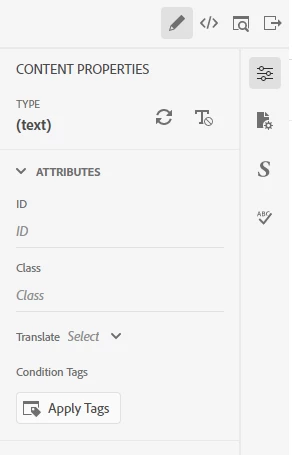
My goal is to be able to select some text, and make it bold, or change the text size, on the fly. BTW, control+B works and makes the selected text bold, but looking for a way to do things like this in the Content Properties panel.

    This topic has been closed for replies.
    Correct answer JamesJim

    I figured out the cause so I thought I should post the answer.

    I had checked “Do not allow inline formatting”. This is found under File > Project Settings. Once I unchecked this, the Font dropdown menu appeared (along with other choices).

    3 replies

    Peter Grainge
    Community Expert
    Community Expert
    December 23, 2021

    Thank you for posting the answer. Often people figure it out but don't post back so the next person with the problem finds the question, is delighted because they think they will find the answer and then discover it isn't there.

    ________________________________________________________
    See www.grainge.org for free Authoring and RoboHelp Information

    Use the menu (bottom right) to mark the Best Answer or Highlight particularly useful replies. Found the answer elsewhere? Share it here.
    JamesJimAuthorCorrect answer
    Inspiring
    December 22, 2021

    I figured out the cause so I thought I should post the answer.

    I had checked “Do not allow inline formatting”. This is found under File > Project Settings. Once I unchecked this, the Font dropdown menu appeared (along with other choices).

    JamesJimAuthor
    Inspiring
    December 22, 2021

    I forgot to mention: I am using RH 2020.6.76.