

JenniR_12
Inspiring
June 3, 2024
Answered

Footer issues in Robohelp 2022.3.93 (Topic Layouts)

  • June 3, 2024
  • 17 replies
  • 6169 views

I'm trying to set up a footer, which seems pretty simple.  Create a topic layout and add the footer into the footer region of my topic layout and then add that to the topic layout line of the Layout tab in my Frameless preset.  When I do this, the footer doesn't show up where I thought it would.  I guess my question is this correct.  It seems awfully high on the screen.  I think I thought it would show up in the bar going across the bottom rather than above this bar (see yellow horizontal bar across the bottom of my example).  It looks awkward  where it's placed.  What am I missing?  Thank you.
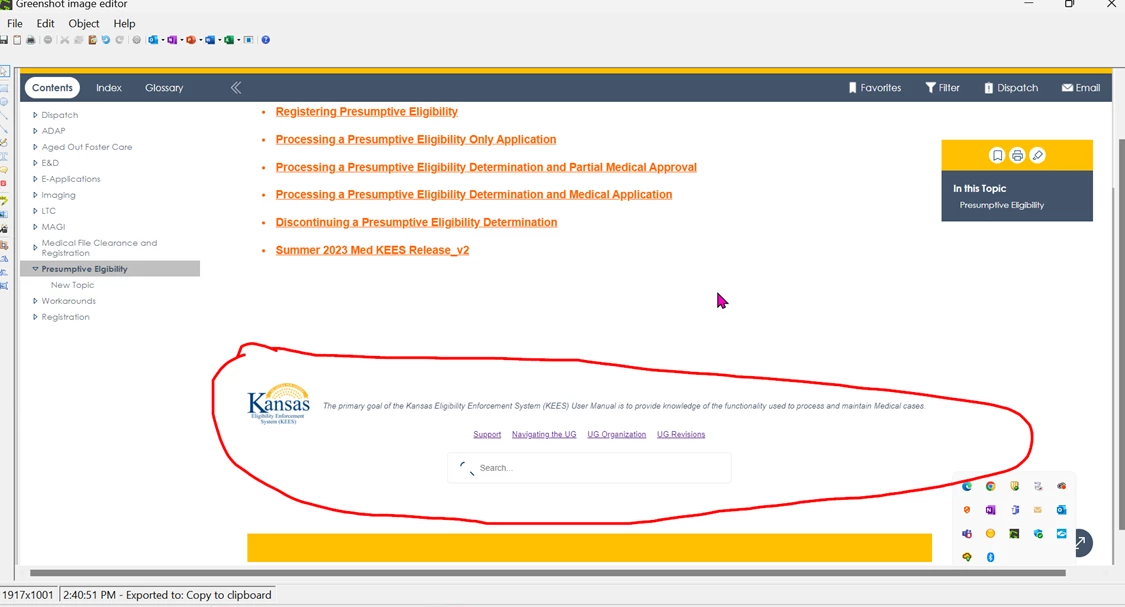


    This topic has been closed for replies.
    Correct answer JenniR_12

    I have clicked on every single optioin (a few times)  It dawned on me that this had to be a container of some sort but I kept thinking it was related to my footer.  This morning I just looked for anything that said container and came across it.  BSC referenced in the inspector = Browse Sequence Container.  I've learned so much doing this.  This is officially resolved.

    17 replies

    Peter Grainge
    Community Expert
    Community Expert
    June 6, 2024

    Next time you have a template problem, take a look at Item 21 in RoboHelp Gems (grainge.org).


    It's a method of seeing all the changes you have made to a template. I haven't ever used it but it is information that Adobe gave me. In your case, the shere number might be a case of not seeing the wood for the trees. 🙂


    I'm still banging my head as to why you customised Oceanic to look more like Studio does by default. As someone who used to frequent these forums used to say, it's like changing the spark plugs via the exhaust pipe. 🙂

    ________________________________________________________

    My site www.grainge.org includes many free Authoring and RoboHelp resources that may be of help.


    Use menu (bottom right) to mark as Best Answer or to Highlight particularly useful replies. Found the answer elsewhere? Share it here.
    JenniR_12
    JenniR_12Author
    Inspiring
    June 6, 2024

    I have already bookmarked the RH Gems page.  It is wonderful.  I ran on to this a month ago or so.  It's been very helpful!!


    Ok. So on the Oceanic / Studio templates.  I was given a directive to use the Oceanic template bc that is something that was decided on prior to me starting here a year ago.    I had no idea what I was going to do with it or how I wanted it to look and so slowly by surely, I figured out how to make some changes and the end result just happened day by day.  Wouldn't recommend this for my next project, but I sure didn't know Robohelp from Robocop when I started here.  I had no idea what I was doing.  At the point you told me that Studio would have been the better choice, I just thought I'm too far in to switch it now.  I've never been one just to take the most direct approach to a problem.  I always have to make it a little interesting.  I am going to look at the Studio template, though,  because I'm curious to see how much extra stuff I have had to do to get this far.  

    Jennifer Rogers
    Peter Grainge
    Community Expert
    Community Expert
    June 7, 2024

    That's even funnier.

    You must use Oceanic.

    OK.

    Later - I have used Oceanic, I've just made it look like something else.


    BTW - I wouldn't tell you what to use, I was just pointing out that it looked like there was an easier route to what you wanted. You have done well to make so many changes when you are new to RoboHelp.

    ________________________________________________________

    My site www.grainge.org includes many free Authoring and RoboHelp resources that may be of help.


    Use menu (bottom right) to mark as Best Answer or to Highlight particularly useful replies. Found the answer elsewhere? Share it here.
    Peter Grainge
    Community Expert
    Community Expert
    June 6, 2024

    Somewhere you said you had clicked on every option.


    From what you are saying now, it looks like you missed this one. 🙂


    As you kept referring to code, I was thinking you had been working at that level.


    Assuming you are fixed now and this thread has served its purpose.

    ________________________________________________________

    My site www.grainge.org includes many free Authoring and RoboHelp resources that may be of help.


    Use menu (bottom right) to mark as Best Answer or to Highlight particularly useful replies. Found the answer elsewhere? Share it here.
    JenniR_12
    JenniR_12AuthorCorrect answer
    Inspiring
    June 6, 2024

    I have clicked on every single optioin (a few times)  It dawned on me that this had to be a container of some sort but I kept thinking it was related to my footer.  This morning I just looked for anything that said container and came across it.  BSC referenced in the inspector = Browse Sequence Container.  I've learned so much doing this.  This is officially resolved.

    Jennifer Rogers
    Peter Grainge
    Community Expert
    Community Expert
    June 6, 2024

    The default template does not have that so it is something you have changed along the way. I don't know if you have done that at code level or in the UI but I hope you listened to me saying you should keep copying your template so that if things go wrong, you can go back to earlier versions and find out where it started.


    I have also encouraged you to work within the UI. On the forum people can suggest where in the UI to look. We have no idea what code changes you have made or how to reverse them. When you generate an output, your customisations in the UI will apply but changes at code level can, I believe, be overwritten by internal files as the generation process is probably not expecting them


    Your images are so far removed from Oceanic that the template looks more like Studio!.


    Without examing your project, I cannot help more on this. I have indicated where I thought the problem is but that doesn't seem to work for you.

    ________________________________________________________

    My site www.grainge.org includes many free Authoring and RoboHelp resources that may be of help.


    Use menu (bottom right) to mark as Best Answer or to Highlight particularly useful replies. Found the answer elsewhere? Share it here.
    JenniR_12
    JenniR_12Author
    Inspiring
    June 6, 2024

    I have worked within the UI.  I don't even know where to go to find the code?  I had to insert some code I found to get the borders to not show on the table I uysed to setup my footer.  I set the borders to "none', but they still showed up.  So, I had to add some code to get those to disappear.  Can I even find the code for the entire webpage so I can look there?  How do I edit the webpage outside of Robohelp?


    If I have to recreate this entire thing it's going to take me forever.  I have been working off of a copy of the template, but I can't go back and recreate all of these changes quickly.  I have foud the problem, I just need to understand how to now remove that problem.  Where do I do that from is my current question.

    Jennifer Rogers
    JenniR_12
    JenniR_12Author
    Inspiring
    June 6, 2024

    Crisis averted.  It was the Browse Sequene Container inside the UI.   I had the background color set to yellow.  I don't even know what browse sequence means....I have it resolved.  Thank you Peter.


    Jennifer Rogers
    Peter Grainge
    Community Expert
    Community Expert
    June 4, 2024

    I'm not entirely clear on the desired appearance now. I suggest you use something like Snagit to mock up what you want it to look like and indicate what is to be non-scrolling. Non-scrolling at the bottom will work but not at the top of the page, in the middle text would disappear behind and then come out above further up. In short, I wouldn't use it other than at the bottom.


    See what you can manage with the information provided and then let us know it is sorted or add an image to explain things.

    ________________________________________________________

    My site www.grainge.org includes many free Authoring and RoboHelp resources that may be of help.


    Use menu (bottom right) to mark as Best Answer or to Highlight particularly useful replies. Found the answer elsewhere? Share it here.
    JenniR_12
    JenniR_12Author
    Inspiring
    June 6, 2024

    I had a chance to look a this again last night and here is what I found.  That yellow bar is coming from something called div#rh-brs.RH-Layout-BRS-container that I can see when I right click on that yellow bar and choose Inspect.  I will put a screenshot below of what I'm referring to.  When I right click on that div#rh-brs.RH-Layout-BRS-container and choose delete, the bar goes away.  Of course, when I refresh my screen, it comes back.  I opened the layout.css and the userstyles.css and I actually removed the div#rh-brs.RH-Layout-BRS-container reference from those files.  But, when I regenerate and view, the yellow bar is back.  Knowing this information, does anyone know how or where I need to remove this reference?  I'm not sure how it got there, but I need it gone for sure.  I just can't figure out where to make it happen since I'm using Robohelp, I'm not sure where to go to edit out that line in the code.  The yellow bar is showing on all pages except for my Home Page (I don't want it on my Home Page so that is good).  I've copie and pasted some screenshots below. indicating what I found.


     In the screenshot below you can see tha the yellow bar shows up even in the template editor.  

    Here, I think that the development tool is showing me that it's in the 2 css files that I mentioned above.


    Any help would be appreciated.  I have no idea how that got there.


    Jennifer Rogers
    Peter Grainge
    Community Expert
    Community Expert
    June 4, 2024

    In another thread that is now locked you have asked about a fixed footer. See RH2022 Non-Scrolling Area (grainge.org)

    ________________________________________________________

    My site www.grainge.org includes many free Authoring and RoboHelp resources that may be of help.


    Use menu (bottom right) to mark as Best Answer or to Highlight particularly useful replies. Found the answer elsewhere? Share it here.
    JenniR_12
    JenniR_12Author
    Inspiring
    June 4, 2024

    I didn't see this, so thank you for pointing me to this information Peter.  I wasn't connecting "non-scrolling area" with anything I needed for the footer.  


    On a different note, I have disabled the static footer in 2 places in the template editor under the Layout Tab at the top and then I clicked on Home Page and Topic Page and toggled off the static footer and I added back in my Topic Layout, regenerated and viewed and the empty yellow bar is still at the bottom.   I thought maybe it was coming from the Topic Layout, so I took the topic layout back out of the Frameless Preset and have the static footers turned off in the template and yet the yellow bar is still there.   I'm going to look at the code again and see if I can figure out where it's coming from.  You have given me some goood info, Peter.  Thank you.  I've got a bit more clarification on what is controlling what with these footers , I think.  The key was that the topic layout doesn't replace the template footer but shows above the template footer.  So that part right there is very helpful.  


    Jennifer Rogers
    Peter Grainge
    Community Expert
    Community Expert
    June 4, 2024

    Assuming we are still talking about a customised Oceanic skin, it's difficult to know where the yellow is coming from. In theory it is the Home Page > Footer > Container colour.


    If you create Topic Layout footer that will appear above the template footer.

    ________________________________________________________

    My site www.grainge.org includes many free Authoring and RoboHelp resources that may be of help.


    Use menu (bottom right) to mark as Best Answer or to Highlight particularly useful replies. Found the answer elsewhere? Share it here.
    JenniR_12
    JenniR_12Author
    Inspiring
    June 4, 2024

    OH!!  Ok, so I don't want a topic layout containing my information because I don't like the way it looks.  Can I only have links in the footer then that the template provides?  Can I have a logo and a text or if I want that stuff, I have to use the topic layout?

    Jennifer Rogers
    Peter Grainge
    Community Expert
    Community Expert
    June 4, 2024

    I'm not sure, it will require setting up a test which I cannot do until sometime tomorrow at best. Essentially I think you need to get rid of the template footer and create what you want in the topic layout. Not sure though so test required. 

    ________________________________________________________
    My site www.grainge.org includes many free Authoring and RoboHelp resources that may be of help.


    Use menu (bottom right) to mark as Best Answer or to Highlight particularly useful replies. Found the answer elsewhere? Share it here.
    Jeff_Coatsworth
    Community Expert
    Community Expert
    June 3, 2024

    Yes, it does look a bit weird - where is that yellow bar coming from?

    JenniR_12
    JenniR_12Author
    Inspiring
    June 3, 2024

    Well if I told you I didn't know where the yellow bar came from would you believe it?   I swear it was just there.  I have no idea how it got there though.  I guess I thought it was from the template.....I'll see if I can figure that out and report back.  Weird!!

    Jennifer Rogers
    JenniR_12
    JenniR_12Author
    Inspiring
    June 3, 2024

    I have no idea where the yellow bar came from.....

    Jennifer Rogers