


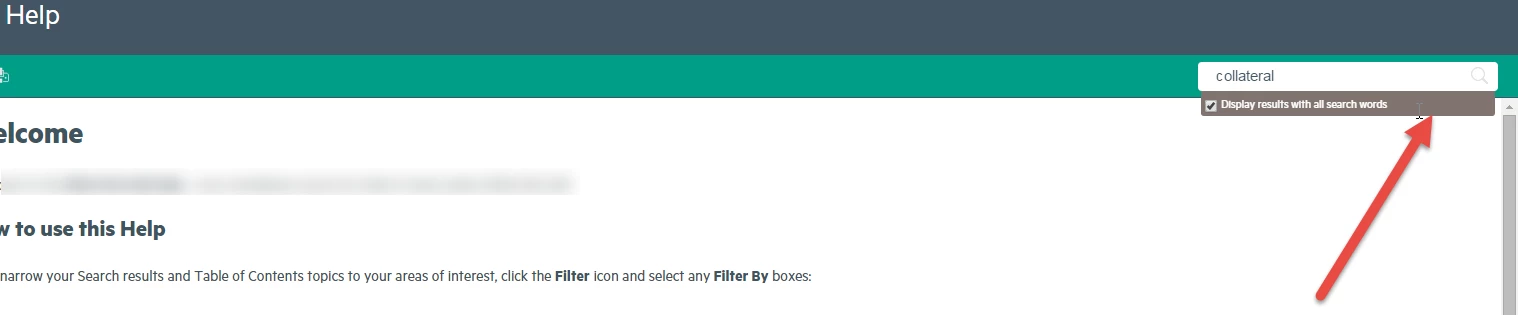
For RH 2015 version 12.0.2.384, how do I change the background color of the "Display results with all search words" area?
I wanted to update my previous post "How do I change the background color of the "Display results with all search words" area I can't find it as an option in the Layout Customization tool" with my findings - after having answered to Willam van Weelden that I could not find the code in the CSS. Since I'd replied, I no longer have the option to re-reply to that post.
I did find the code! However, it was ever-so-slightly different than Willam's answer. I don't know if it's a version issue or that he was referring to the Azure Blue css and I'm in the Charcoal Gray css, but no matter. Here's the string I personally edited to make it work:
body.media-desktop div.topic div.functionholder div.searchbar-extra div.searchAND.layout-visible
Its original color was 232323 (which is black). I made mine 80746E, a medium bronze, as shown here by the red arrow.
Thanks again, Willam and Rick. I was determined to get that "ah-ha" moment, and it paid off.  Life is good.
Note: Again, This change is for the desktop output of the Charcoal-Grey layout.css.
 AdChoices