Known Participant
July 9, 2019
Question

Format to Bold

  • July 9, 2019
  • 1 reply
  • 2223 views

Hi again,

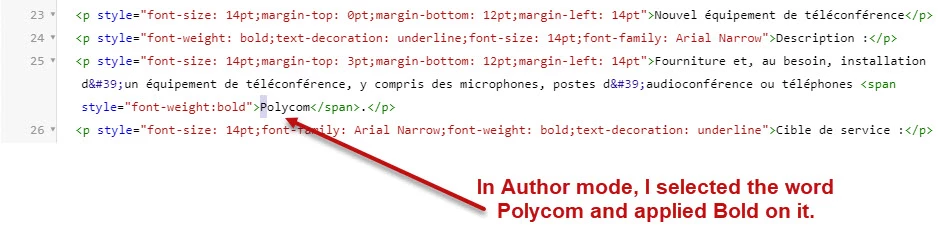
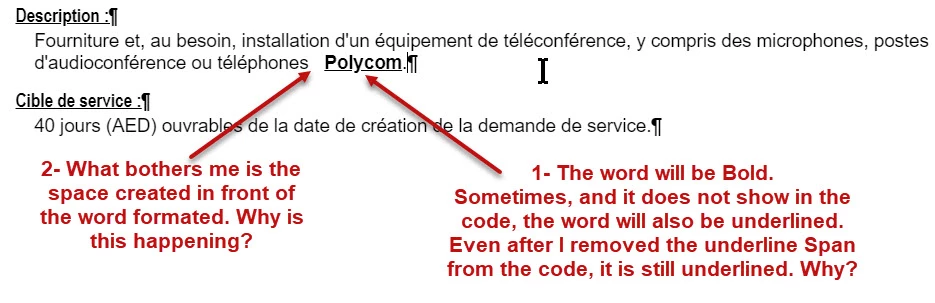
This time, I selected a word in a paragraph (Polycom). I applied the Bold format by clicking the "B" button. The word was formatted, but a space was added at the left of the word. This space can't be selected. Also, by clicking the "Bold" icon, an underline appeared under the word. Both formats can't be remove by clicking the "B" or "U" icons. Have the delete the Span codes.

Why the extra undeletable space and why the unrequested underline?
Cheers!

This topic has been closed for replies.

1 reply

Peter Grainge
Community Expert
Community Expert
July 9, 2019

I mean no offence when I say there is a feel of something seriously hawked about either this project or your machine. With no code to cause underlining and another issue that I have not experienced or heard of, I get that feeling.

Can you try this project on another machine to see if these issues occur there?

Are you having issues with other programs?

I think my next trick would be to import that topic into a new project and see if you can force the issue there. If you can, then see the Contact page on my site and send the new project as instructed there. Do make sure you include a link to this thread and please do not email the project direct.

Do you have all the updates applied? You should be on Update 7.


See www.grainge.org for free RoboHelp and Authoring information.

@petergrainge

Use the menu (bottom right) to mark the Best Answer or Highlight particularly useful replies. Found the answer elsewhere? Share it here.
Known Participant
July 10, 2019

Hi,

Nope! No issues with other software.

It's not the first time this happened. Already tried it on an other computer, the one I had a few weeks ago. This is a new laptop with a new installation of RoboHelp 2019. So, one issue on two computers.

One thing I forgot to mention, this happened in a drop down text box.

Cheers!

Peter Grainge
Community Expert
Community Expert
July 10, 2019

I just tested your steps and cannot replicate the problem.

Have you tried it in another project?


See www.grainge.org for free RoboHelp and Authoring information.

@petergrainge

Use the menu (bottom right) to mark the Best Answer or Highlight particularly useful replies. Found the answer elsewhere? Share it here.