
Known Participant
March 12, 2018
Question

Formatting Issues - RH2017 - When previewing an item

  • March 12, 2018
  • 5 replies
  • 506 views

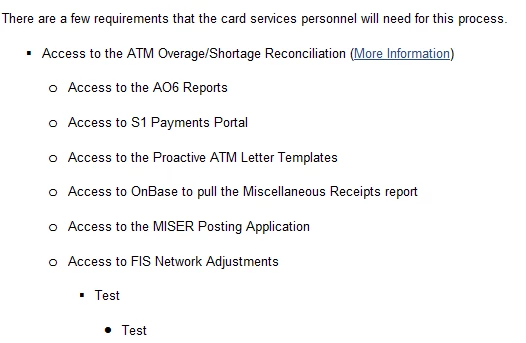
I am having an issue with my style sheet and the bullets, 1 through 4 not showing on the preview button properly.  On my work space the bullets look fantastic and spaced properly as shown below:
However, when I preview the topic, the spacing is correct, however, the bullets are not:
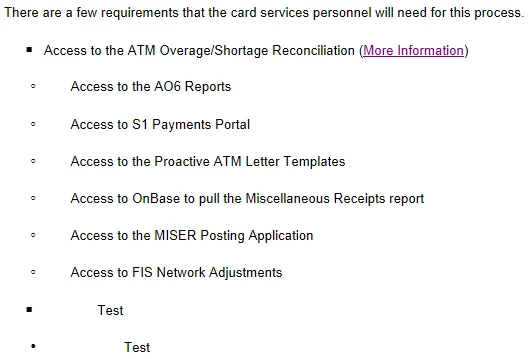
Does anyone know how to correct this so when I publish my topics to our intranet, the bullets don't look like this?  I am at a loss as to why it looks like this.  Again I am using RH 2017.

Thanks!

This topic has been closed for replies.

5 replies

OSBRobAuthor
Known Participant
March 12, 2018

Jeff....I would be happy to show you, however, where would you go in the CSS to see HTML code?  All I see if the actual details of the bullet....Fonts...Indent...Spacing..etc.  However, it is not in HTML code.  So is that what you want.  the HTML Code form the topic and a screenshot of the formatting of the bullet itself?  If not, let me know.

Jeff_Coatsworth
Community Expert
Community Expert
March 12, 2018

Thinking more of the HTML in the output topic for the bullet (to see the tag applied to it) and the section in the referenced CSS in Notepad where that tag is defined.

OSBRobAuthor
Known Participant
March 12, 2018

Thank you gentlemen for all the information.  I have looked at everything all of you stated to look at and it all looks correct to me.  Interesting thing is that I had no issue when I was using RH10.  I will keep hunting.  We haven't officially rolled over to RH 2017 so I have some time to figure this out.

Jeff_Coatsworth
Community Expert
Community Expert
March 12, 2018

Can you show us screenshots of the HTML of the offending bullet line & the corresponding entry in the CSS?

OSBRobAuthor
Known Participant
March 12, 2018

Thanks for info Jeff, but I have checked the CSS and it all looks correct.  It is the exact same info as shown in the formatting pod within RH 2017.  So are you saying to still start playing with the spacing of the bullets in the CSS even though they are identical to the formatting pod?

Thanks for your help!

Jeff_Coatsworth
Community Expert
Community Expert
March 12, 2018

I'd check one of the offending output topics and take a look at the HTML - I found a bug a few versions back that showed 2 CSS file references in the header of my topics - the second CSS was the one that was followed, even though I had it correct in the first one.

Peter Grainge
Community Expert
Community Expert
March 12, 2018

If two CSS files are specified, the logic is that anything in the second one adds to what is in the first one. So if <p> is defined in the first as red normal weight and in the second as bold, you will get red bold.

Anything in the first applies where not overridden in the second one.


See www.grainge.org for free RoboHelp and Authoring information.

@petergrainge

Use the menu (bottom right) to mark the Best Answer or Highlight particularly useful replies. Found the answer elsewhere? Share it here.
OSBRobAuthor
Known Participant
March 12, 2018

Thanks for the info Rick, however, can you tell me where I would need to "tweak things"?  I wouldn't go to the Formatting pod, as the bullets are spaced correctly, so where would I go to make the tweaks?  BTW, we here use IE 11 to view the topics once published to our intranet.

Thanks again!

Robert

Jeff_Coatsworth
Community Expert
Community Expert
March 12, 2018

Nope, you're playing with the CSS that's applied to the output files - tweak & witness the effect in your browser.

Captiv8r
Legend
March 12, 2018

Welcome to the wacky wonderful world of inconsistencies in CSS!

Basically, you need to spend time in what I call the "CSS Loop". Meaning, you tweak things and test in all the different browsers.

I've always called the RoboHelp Preview "RoboHelp's best guess" at how things will look. Because it's just one possible view of what your end user may see. You won't know for sure until you generate and test in different browsers. And each browser will likely have its own little quirks.

Cheers... Rick