Gania
Inspiring
August 6, 2015
Answered

formatting space between bullets & Numbers and text

  • August 6, 2015
  • 1 reply
  • 1045 views

Where can I go to format the spacing between bullets and numbers and the text that follows them?
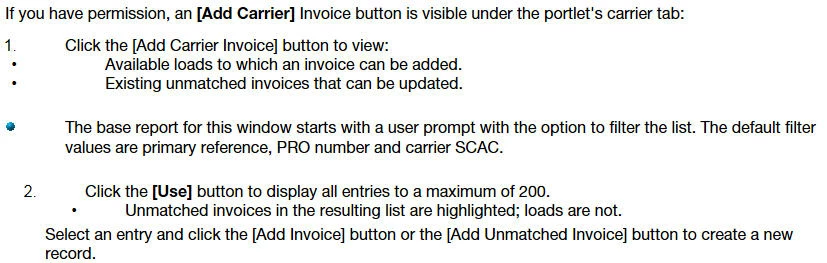
Thanks

This topic has been closed for replies.
Correct answer Peter Grainge

I created a new project and tried it and the spacing was correct. Please don't tell me my project is corrupt.


Open the two CSS files in a text editor and look for differences. Do the same with the topics. There will be a difference somewhere.

Post back if still stuck.


See www.grainge.org for RoboHelp and Authoring tips

@petergrainge

1 reply

Jeff_Coatsworth
Community Expert
Community Expert
August 6, 2015

It's all controlled by the RH Styles and/or your CSS that's applied to the HTML pages. Does the HTML think you've got ordered lists and unordered lists in this sample?

Gania
GaniaAuthor
Inspiring
August 6, 2015

That I get, and for this I was using the default .css. But I can't believe the default would have that wide a space and when I go in to edit, I don't see any place to adjust between the list style and the text.

Peter Grainge
Community Expert
Community Expert
August 6, 2015

Create a new single topic project and use the default CSS in that to recreate the same content (don't cut and paste it).

Does the problem still occur?


See www.grainge.org for RoboHelp and Authoring tips

@petergrainge

Use the menu (bottom right) to mark the Best Answer or Highlight particularly useful replies. Found the answer elsewhere? Share it here.