



Marc M.
Inspiring
March 25, 2021
Question

Frame around images not possible with pop-up

  • March 25, 2021
  • 1 reply
  • 220 views

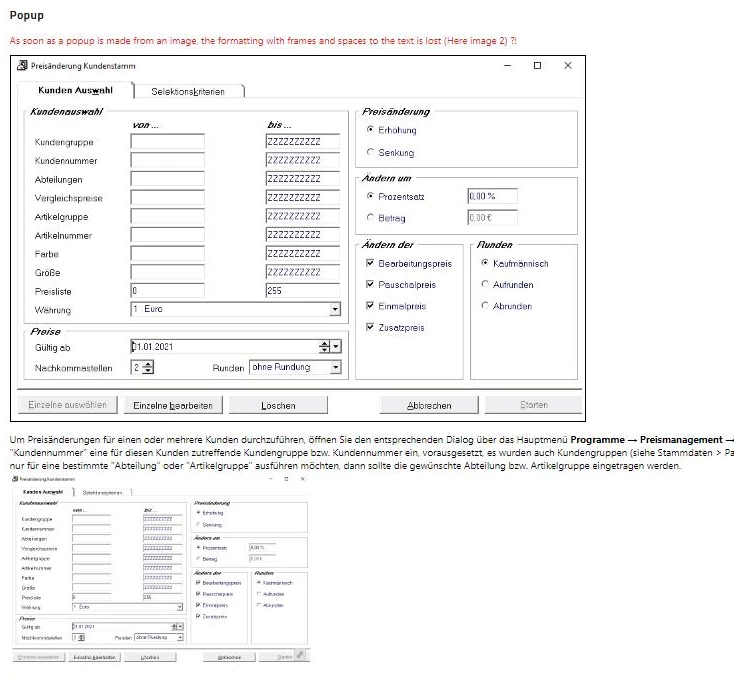
When we insert an image in a content and want to have a frame around it, this frame does not work for image as "pop-up".

In the screenshot below once the image in original size and below it as pop-up.
Is this a known behavior?


    This topic has been closed for replies.

    1 reply

    Peter Grainge
    Community Expert
    Community Expert
    March 25, 2021

    It looks like the same issue as with Printed Documentation, borders have to be part of the image itself. It has always been that way to the best of my knowledge. I don't know if there is a technical reason why they don't work so try a feature request.


    Please follow this link to request features. https://tracker.adobe.com

    Post the link to your feature request in this thread and others can vote for it. The more people who do so, the higher it gets prioritised.


    For now though I think you will have to live with applying borders to the image. You haven't said which version you are using but if the request is implemented, it would only be in the latest version.

    ________________________________________________________
    See www.grainge.org for free Authoring and RoboHelp Information

    Use the menu (bottom right) to mark the Best Answer or Highlight particularly useful replies. Found the answer elsewhere? Share it here.
    Marc M.
    Marc M.Author
    Inspiring
    March 26, 2021

    Thanks for your advice.

    I will create an ticket for that.

    We are using Robohelp 2020.3.0