


Sleant
Inspiring
January 27, 2026
Question

Frameless Header Links

  • January 27, 2026
  • 2 replies
  • 24 views

Using 2022.6.34. Forgive me on this question:

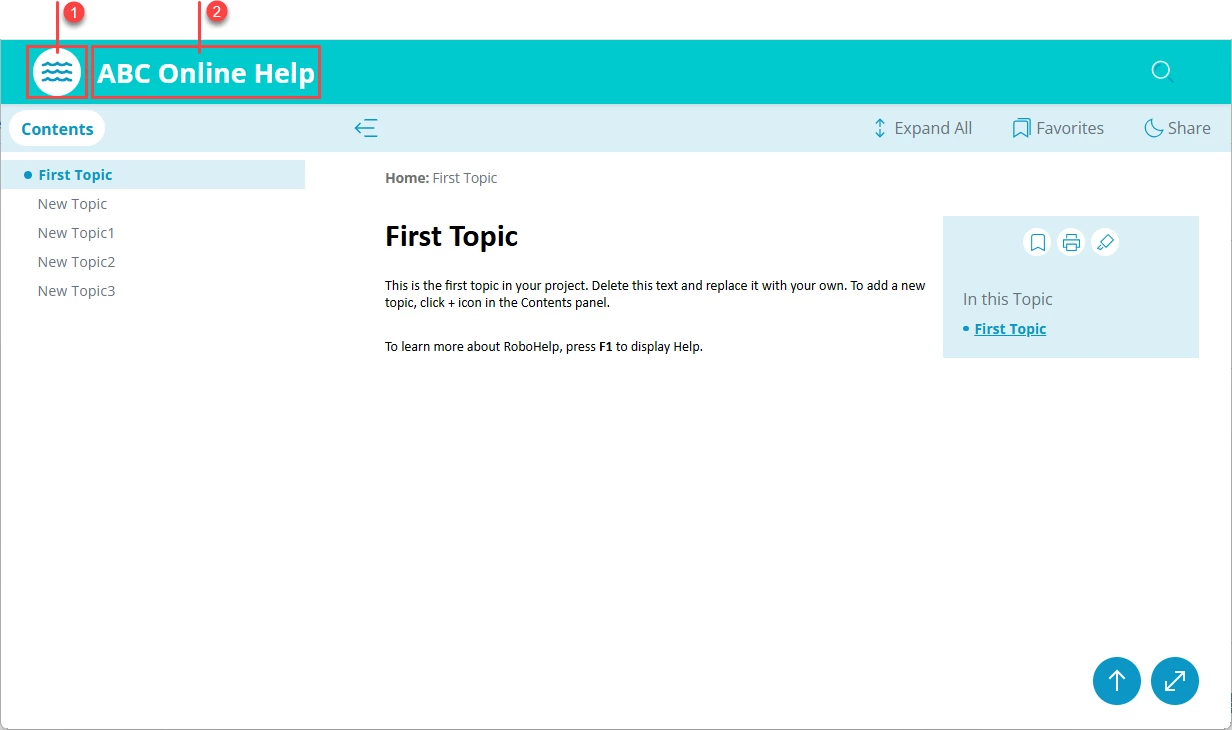
Where do I edit the frameless header, specifically in the 1 and 2 illustrated in the image below? I want to disable it from going to the homepage and/or making it go to a particular topic in the TOC. Thank you SO MUCH!
 

2 replies

Peter Grainge
Community Expert
Community Expert
January 30, 2026

You can hide the logo but the area remains active, it will still go to the first topic or whatever you set in the link.


My site www.grainge.org includes many free Authoring and RoboHelp resources that may be of help.


Use menu (bottom right) to mark as Best Answer or to Highlight particularly useful replies. Found the answer elsewhere? Share it here.
Jeff_Coatsworth
Community Expert
Community Expert
January 28, 2026

That looks the Oceanic template - you should be able to edit it after selecting it in the Output Preset (provided you’ve given it a new name like “Oceanic2”).

Sleant
SleantAuthor
Inspiring
January 29, 2026

Thank you. However, how do I disable it from going to the homepage? Thx again, Jeff. 

Jeff_Coatsworth
Community Expert
Community Expert
January 29, 2026

I thought there were some settings that control that top line of the screen - like the background colour, the logo image & the URL that it’s pointing to. Why do you want to stop it from going back to the default topic anyways? That’s kind of standard website convention these days.