Legend
May 5, 2022
Answered

Frameless output - Change tooltip for button "Favorites"

  • May 5, 2022
  • 4 replies
  • 412 views

Hi all,

Is there an option to change the tooltip for the button "Favorites" in the frameless output? I could not find this term under "Labels" in the Output tab in RH. It says "Favorites", even though my project language is German and the same button below says "Als Favorit festlegen".

I am talking about this button:
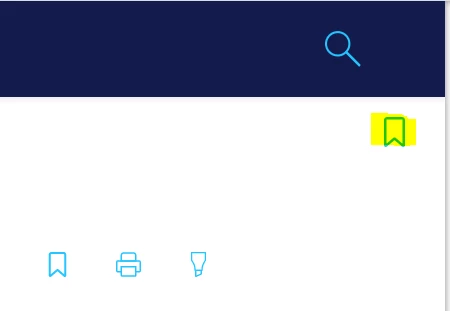
The wording for all other buttons could be found in Labels.

Best regards

Karin

    This topic has been closed for replies.
    Correct answer Peter Grainge

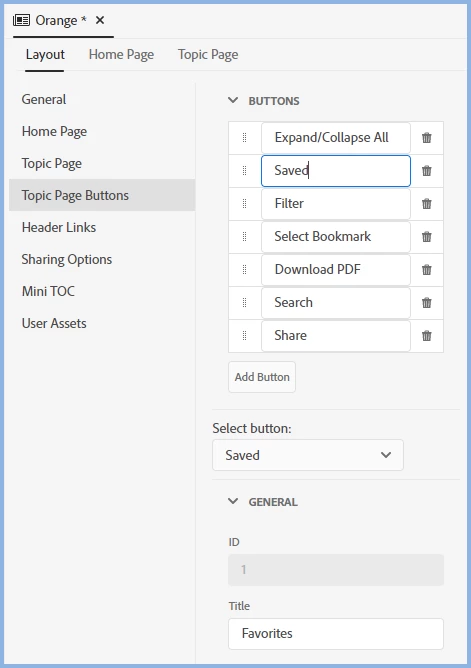
    Solution found when I took this up with Adobe. Click on Saved in the skin and see the Title field.


    I'm guessing that this button is the saved favourites. I know!


    ________________________________________________________

    My site www.grainge.org includes many free Authoring and RoboHelp resources that may be of help.


    4 replies

    Community Expert
    May 6, 2022

    Also, why are the labels there instead of with all the other labels? \_0_/

    Peter Grainge
    Community Expert
    Community Expert
    May 6, 2022

    @Amebr The user can add more buttons that would need labels and they would not be in the labels file. Hence they are all here for those buttons. Had the button been labelled Favorites, it would have been found more easily but clipping Saved Favorites to Saved made it difficult.


    That is going to be changed.

    ________________________________________________________

    My site www.grainge.org includes many free Authoring and RoboHelp resources that may be of help.


    Use the menu (bottom right) to mark the Best Answer or Highlight particularly useful replies. Found the answer elsewhere? Share it here.
    Community Expert
    May 7, 2022

    Oh good point. Does highlight that the documentation needs a lot of work. 🙂

    Legend
    May 5, 2022

    Nice! Thank you. I checked the "Select Bookmark" button, but didn't consider "Saved" 🙂

    Peter Grainge
    Community Expert
    Community Expert
    May 5, 2022

    Why would you? Point made to Adobe.

    ________________________________________________________

    My site www.grainge.org includes many free Authoring and RoboHelp resources that may be of help.


    Use the menu (bottom right) to mark the Best Answer or Highlight particularly useful replies. Found the answer elsewhere? Share it here.
    Peter Grainge
    Community Expert
    Peter GraingeCommunity ExpertCorrect answer
    Community Expert
    May 5, 2022

    Solution found when I took this up with Adobe. Click on Saved in the skin and see the Title field.


    I'm guessing that this button is the saved favourites. I know!


    ________________________________________________________

    My site www.grainge.org includes many free Authoring and RoboHelp resources that may be of help.


    Use the menu (bottom right) to mark the Best Answer or Highlight particularly useful replies. Found the answer elsewhere? Share it here.
    Peter Grainge
    Community Expert
    Community Expert
    May 5, 2022

    It looks like an omission. You know the drill.


    Please follow this link to report bugs or request new features. https://tracker.adobe.com. Post the link to your bug report / feature request in this thread and others can vote for it. The more people who do so, the higher it gets prioritised.

    ________________________________________________________

    My site www.grainge.org includes many free Authoring and RoboHelp resources that may be of help.


    Use the menu (bottom right) to mark the Best Answer or Highlight particularly useful replies. Found the answer elsewhere? Share it here.