


Legend
May 12, 2022
Question

Frameless Output - Print function cuts off last couple of lines

  • May 12, 2022
  • 6 replies
  • 302 views

Hi all,

in RH2020.7.46, the printing functionality in the frameless output cuts off the last 2-4 lines of a topic that is longer than 1 page.
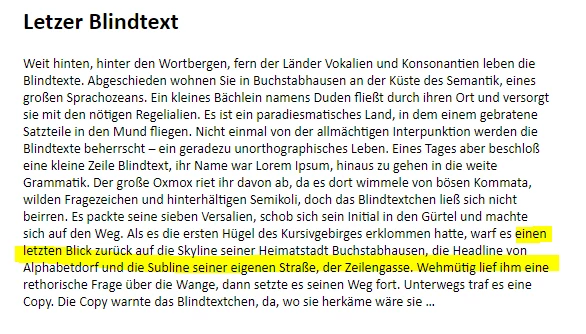
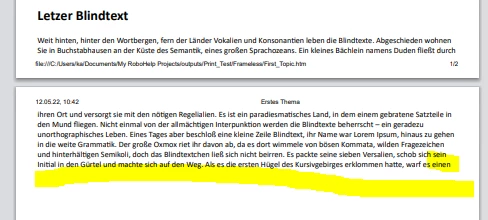
Apparently, in the sample projects, this problem did not occur as there all topics have a couple of blank lines added at the end.

Has anyone already reported this behaviour as a bug? Otherwise, I will do so.

Best regards

Karin

    This topic has been closed for replies.

    6 replies

    Legend
    May 12, 2022

    I created a bug for this. You can vote for it here: https://tracker.adobe.com/#/view/RH-10766

    Thanks for your help, Peter!

    Peter Grainge
    Community Expert
    Community Expert
    May 12, 2022

    Definitely a bug as it should print the whole page without extra lines.

    ________________________________________________________

    My site www.grainge.org includes many free Authoring and RoboHelp resources that may be of help.


    Use the menu (bottom right) to mark the Best Answer or Highlight particularly useful replies. Found the answer elsewhere? Share it here.
    Legend
    May 12, 2022

    Nice workflow, thank you, Peter.

    However, do you consider this behavior being "as designed" or should I file it as a bug?

    Peter Grainge
    Community Expert
    Community Expert
    May 12, 2022

    I see the same.


    You could

    1. Create a backup first.
    2. Add two lines and apply a condition in one topic.
    3. Go to source view and copy those lines and the closing body tag </body> to the clipboard.
    4. Close the topic without saving the new lines.
    5. Paste the clipboard into the Replace field.
    6. Find is </body>
    7. Select topics and source view.


    That will blast the new lines into all topics.

    ________________________________________________________

    My site www.grainge.org includes many free Authoring and RoboHelp resources that may be of help.


    Use the menu (bottom right) to mark the Best Answer or Highlight particularly useful replies. Found the answer elsewhere? Share it here.
    Legend
    May 12, 2022

    Yes and yes. It can also be seen on your site, e.g. try to print https://www.grainge.org/pages/authoring/rh_tour/rh2020/introduction/2020.htm

    In my case, the print preview cuts off after "Translation".

    Having to add the lines would be pretty uncomfortable as 1) I do not know how many lines would need to be added and 2) I would have to tag them to be "online only", as I need to create PDF outputs as well.

    Peter Grainge
    Community Expert
    Community Expert
    May 12, 2022

    Does it occur in the sample if you remove those blank lines? They are there as it can help with online viewing too.


    Also does adding blank lines to your project fix the issue? I realise it's something you might not want to do but it would establish that is the issue.

    ________________________________________________________

    My site www.grainge.org includes many free Authoring and RoboHelp resources that may be of help.


    Use the menu (bottom right) to mark the Best Answer or Highlight particularly useful replies. Found the answer elsewhere? Share it here.