


Known Participant
September 14, 2023
Question

Frameless Skin RoboHelp 2022 - sub sections not indenting

  • September 14, 2023
  • 5 replies
  • 577 views

I have created a Responsive Frameless Skin in RoboHelp 2022.  I cannot figure out how to get my sub books (called sections in RoboHelp 2022) to indent under parent books (called sections in RoboHelp 2022).  Instead all books are aligned left after I generate.  For example, if Folder Two should be under Folder One, how do I modify the skin to ensure it is indented slightly to the right when Folder One is expanded just like Topic One and Topic Two are indended?
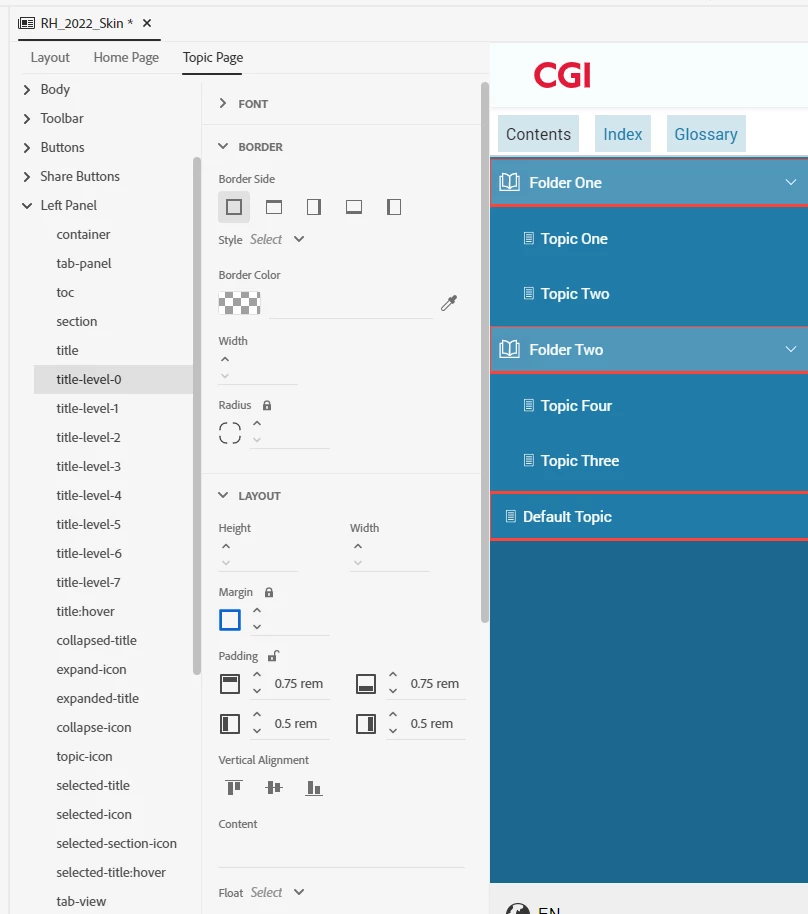
Thank you!

    This topic has been closed for replies.

    5 replies

    Peter Grainge
    Community Expert
    Community Expert
    September 14, 2023

    In the image of the template editor that you posted, did you make any changes there? I have never used that but theoretically it could force this issue.


    Create a new template, label it Studio2 and select that in the preset. Do not customise it at all. See what you get then.

    ________________________________________________________

    My site www.grainge.org includes many free Authoring and RoboHelp resources that may be of help.


    Use menu (bottom right) to mark as Best Answer or to Highlight particularly useful replies. Found the answer elsewhere? Share it here.
    Peter Grainge
    Community Expert
    Community Expert
    September 14, 2023

    This is what I get with a virgin Studio template. Folder Two indented.


    ________________________________________________________

    My site www.grainge.org includes many free Authoring and RoboHelp resources that may be of help.


    Use menu (bottom right) to mark as Best Answer or to Highlight particularly useful replies. Found the answer elsewhere? Share it here.
    Peter Grainge
    Community Expert
    Community Expert
    September 14, 2023

    Which template (skin) are you using?

    ________________________________________________________

    My site www.grainge.org includes many free Authoring and RoboHelp resources that may be of help.


    Use menu (bottom right) to mark as Best Answer or to Highlight particularly useful replies. Found the answer elsewhere? Share it here.
    Known Participant
    September 14, 2023

    I'm pretty sure I selected Studio.

    Peter Grainge
    Community Expert
    Community Expert
    September 14, 2023

    Sorry but I had no idea how long you have been using RoboHelp until you told us and showing the skin editor was so wrong, it seemed like a rookie issue. 


    Let's check I am following.


    Here Folder Two is indented.


    In the output you should see this with that structure.


    Instead you are seeing Folder Two at the same level as Folder One.


    Please confirm that is the issue. If it is, then please locate the About RoboHelp sample project and test that works OK. RoboHelp creates two copies of the samples on installation. 

    • The copy to use is put in My RoboHelp Projects in the Documents folder that Windows creates in your profile.
    • Another copy goes into Program Files and should never be run from there as Windows will block some of the functionality.  The idea of the copy in Program Files is that it is a clean back up if you need to replace the copy in Documents.

    ________________________________________________________

    My site www.grainge.org includes many free Authoring and RoboHelp resources that may be of help.


    Use menu (bottom right) to mark as Best Answer or to Highlight particularly useful replies. Found the answer elsewhere? Share it here.
    Known Participant
    September 14, 2023

    Yes, what you described above is what occurs when I generate using the Frameless Skin.  I created a Frameless Skin (Responsive). 

    Peter Grainge
    Community Expert
    Community Expert
    September 14, 2023

    Yes but which one? 

    ________________________________________________________
    My site www.grainge.org includes many free Authoring and RoboHelp resources that may be of help.


    Use menu (bottom right) to mark as Best Answer or to Highlight particularly useful replies. Found the answer elsewhere? Share it here.
    Peter Grainge
    Community Expert
    Community Expert
    September 14, 2023

    You need to be in the TOC editor. Here folder two is inline. If I click the arrow, it will be indented.


    ________________________________________________________

    My site www.grainge.org includes many free Authoring and RoboHelp resources that may be of help.


    Use menu (bottom right) to mark as Best Answer or to Highlight particularly useful replies. Found the answer elsewhere? Share it here.
    Known Participant
    September 14, 2023

    Yes, I have the sub books indented in my TOC.  But they all align left when I generate using the frameless Skin.  I've used RoboHelp for 23 years and never had this issue in earlier versions of RoboHelp.


    Jeff_Coatsworth
    Community Expert
    Community Expert
    September 14, 2023

    Are you on Patch 3?

    Jeff_Coatsworth
    Community Expert
    Community Expert
    September 14, 2023

    What's the TOC look like?