


Participating Frequently
May 13, 2021
Question

FrameMaker Link Settings in RoboHelp 2020 - Mapping paragraph styles to HTML Tags

  • May 13, 2021
  • 4 replies
  • 589 views

I'm attempting to map a FrameMaker Heading1 paragraph style to a RoboHelp (CSS) H1 tag.

I want the end HTML to be something like:

<h1> ... </h1>

Instead I get:

<p class="Heading1"> .... </p>


Notes:

- Using fully patched FrameMaker and RoboHelp 2020. 

- Separately I migrated the project and I do get the expected <h1> tag, but the migrated project doesn't retain the link to the source FrameMaker book, so it's not much use. (I've raised a bug with Adobe.)

- Mapping appears to be correct (see screenshot)
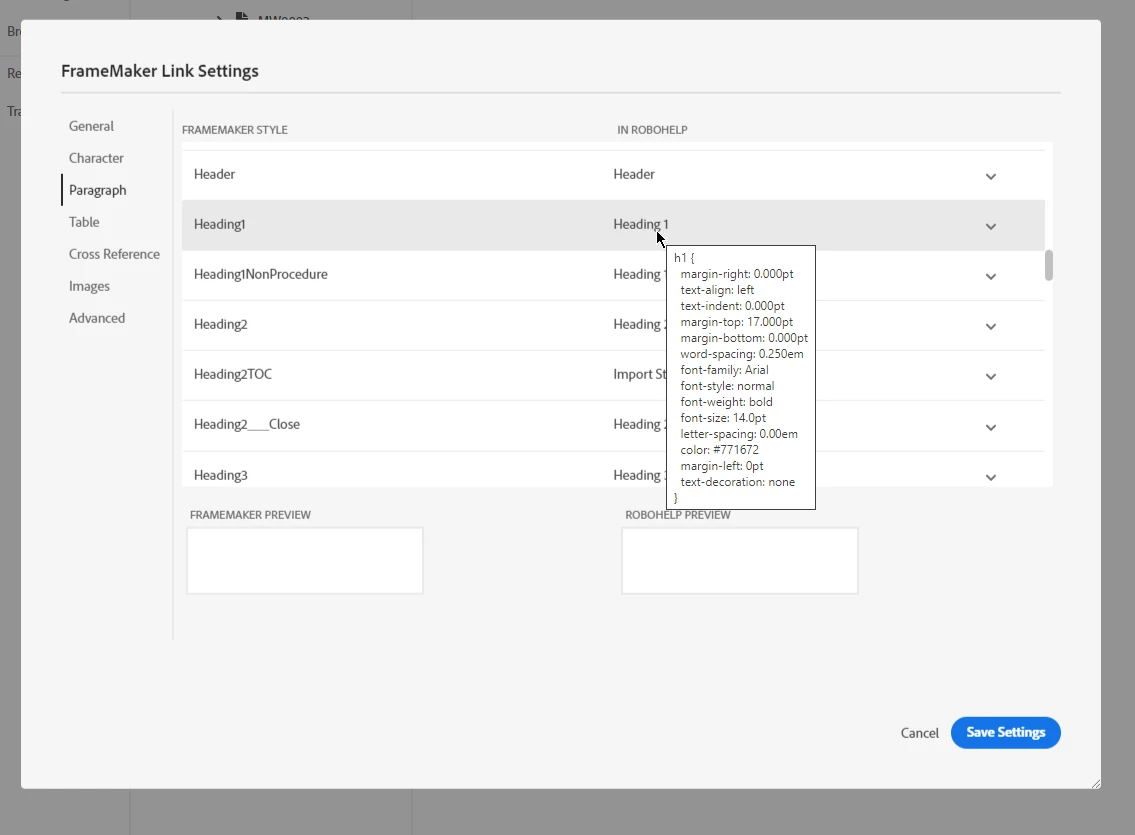
- default.dfs - is there a way of mapping the FrameMaker style to h1 using <htmltag> ?


This isn't the only issue I have with FrameMaker link settings but if I can get this to work maybe the same method can be used with the rest. 

All help appreciated.

    This topic has been closed for replies.

    4 replies

    Vivek Kumar
    Adobe Employee
    Adobe Employee
    June 22, 2021

    Hi Paul,

    Surbhi has written to you for some issues. Let's discuss this also as part of that.

    Thanks,

    Vivek

    Vivek Kumar
    Adobe Employee
    Adobe Employee
    June 18, 2021

    Hi Paul,

    This issue has been resolved in update 5. Did it work for you?

    Thanks,

    Vivek

    PaulJenaAuthor
    Participating Frequently
    June 20, 2021

    Hi Vivek

    The settings may be saved but the more important point is they're not being correctly applied and that is still the case. The example of mapping failure given above still applies.

    Best Regards

    Paul 


    Jeff_Coatsworth
    Community Expert
    Community Expert
    May 13, 2021

    Sounds like there are 2 bugs - migrating linked projects don't preserve the linking to the source FM content & fresh projects are linking, but not respecting your mapping selections. Better fire up the Tracker (https://tracker.adobe.com/) 😁

    PaulJenaAuthor
    Participating Frequently
    May 13, 2021

    I've updated an existing ticket I raised on linking issues: RH-9116, Issues with linking FrameMaker (FM) to RoboHelp (RH). Thanks for your help again

    Jeff_Coatsworth
    Community Expert
    Community Expert
    May 13, 2021

    "Separately I migrated the project and I do get the expected <h1> tag, but the migrated project doesn't retain the link to the source FrameMaker book, so it's not much use." - that sounds like you've imported the FM content, not linked it (imports are a one-and-done sort of scenario). There may be a bug where the mapping in a linked project isn't working.

    Have you tried creating a new blank RH project and linked the FM content to it? I'm unclear of the processes you've tried.

    PaulJenaAuthor
    Participating Frequently
    May 13, 2021

    The migration (using Upgrade RoboHelp Classic Project) was a separate project, all of the formatting came through as expected including the header tags but no link to the source FrameMaker files.


    I created a new, empty project and linked in a FrameMaker book. The content is linked but the mapping doesn't appear to work as expected.