
Inspiring
October 3, 2022
Answered

Generate multi-language documentation with language selector

  • October 3, 2022
  • 1 reply
  • 252 views

Hi all!

I am generating documentation in Responsive HTML5 and I want to exploit the multi-language functionality offered by RoboHelp. My original project is developed in Spanish and I see that I can generate a project with the English translations, but I could not find if in the final publication it is possible to offer both languages in the form of a selector. Something like this:
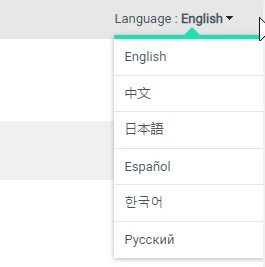
This is my doubt, what is the correct procedure to publish a project in several languages? Is it possible to do it directly on RoboHelp?

Thanks in advance.

    This topic has been closed for replies.
    Correct answer Esperanza249659241eot

    Thank you very much, @Peter Grainge for your quick response.

    I linked the projects in the different languages using a master project.


    1 reply

    Peter Grainge
    Community Expert
    Community Expert
    October 3, 2022

    This was asked recently so check the other thread as well. Each project is quite separate to there isn't a dropdown or similar option.


    You would create a link to the other project(s) in the same way as any other two projects.


    There may also be an exising feature request in the other thread or independently.


    You can search the bugs/features at https://tracker.adobe.com or create a new request. Post the link to your bug report / feature request in this thread and others can vote for it. The more people who do so, the higher it gets prioritised.

    ________________________________________________________

    My site www.grainge.org includes many free Authoring and RoboHelp resources that may be of help.


    Use the menu (bottom right) to mark the Best Answer or Highlight particularly useful replies. Found the answer elsewhere? Share it here.
    Esperanza249659241eotAuthorCorrect answer
    Inspiring
    October 4, 2022

    Thank you very much, @Peter Grainge for your quick response.

    I linked the projects in the different languages using a master project.