

Generate two different CHMs that has its own Footer section
OS = Win 7
Rh Ver = 11
My goal: To generate two different CHMs that has its own branding (proprietary verbiage in Footer section) appear on bottom of help topics located on the Online Help window (CHM), WITHOUT using the old configuration (mentioned below).
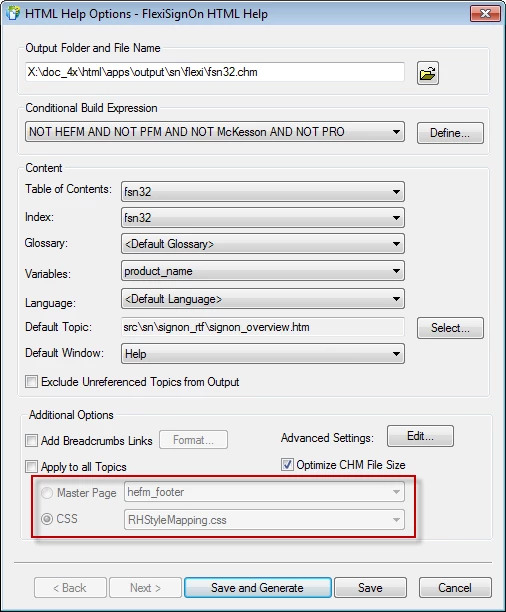
Current configuration (Old): A single Master page with a Footer that has Product B proprietary verbiage. Note, this master page is used for both instances (Product A & Product B). What makes the two products (Product A and Product B) unique during the generation process showing this header, it is using a Conditional Build Tag over the verbiage in the footer section hence, trigger by the “Conditional Build Expression”. Picture below shows the HTML Help Options.
Since the inception of Rh 11, we now have the optional to use multiple header/footer master pages for “Print Documentation” hence; I can assign a specific footer for Product B and in theory, I can remove this footer section.
Questions:
- If I remove the footer verbiage, how can I apply a different footer for Product A and Product B when I generate CHMs?
- If I select the Master Page check box (enables the Master Page and CSS radio buttons) and select Master Page (i.e., my pull down list would show Product A and Product B), will this affect any Styles that are using my RhSytleMapping.css?
- Does the Gray-out section (ref. above in the picture, outlined in red) mean that these features are disabled?
Below, I typed out Rh help topic, but I am still unclear on the descriptions.
Thank you,
~PM
Rh 11 help topic descriptions in question are as follows:
Apply To All Topics: Select this option to apply master pages or CSS at the project level:
- Master Page: The selected master page overrides the settings of all the individual topics with or without a master page applied to them in the project. The CSS and layout of the master page override the CSS and appearance of all the topics. For example, if the selected master page doesn’t have a header or footer, topics won’t either.
- CSS: The master pages associated with individual topics become effective. The selected CSS overrides all the topics and their CSS irrespective of whether they are associated with a master page or not.


 AdChoices