


Participating Frequently
June 21, 2023
Question

generating printed documentation (.docx) stuck on processing topics, then kicks me out

  • June 21, 2023
  • 4 replies
  • 511 views

hi,

i am using RH 2017

i am trying to batch generate different formats.

the only one i am having an issue with is the printed documentation in the word format (.docx)

it's just stuck on processing topics. sits there for a good 30 min, then just crashes robohelp.
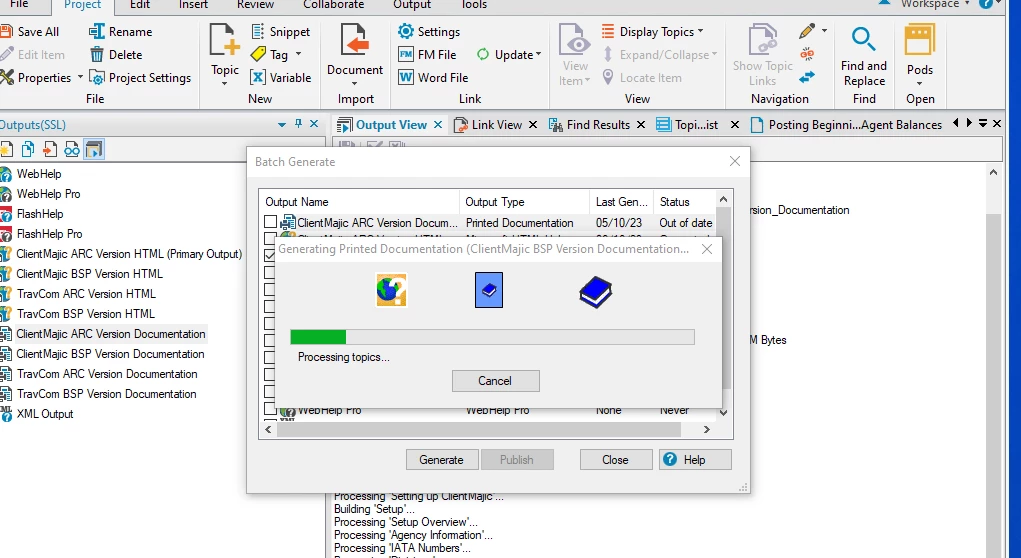


when i open it again, and try to generate again, i get message "file is locked"


i am able to generate HTML. 

any help would be greatly appreciated.

    This topic has been closed for replies.

    4 replies

    Community Expert
    June 26, 2023

    Sometimes working on a network drive can cause corruption, or working in the Documents folder can hit the maximum path length in Windows really easily (this is also problem for network locations). But your temp project is local, shouldn't be hitting the long path issue and the word doc is also being generated locally.


    If you haven't already, definitely try the divide & conquer method Jeff mentioned to see if you can identify the specific topics the build is failing on.

    Community Expert
    June 23, 2023

    Where is your project located? Is it in a short path directly off your C drive? In your Documents folder? On a network share? In OneDrive/GoogleDrive? Could you also answer the same questions for where you are generating your word document to?

    Participating Frequently
    June 23, 2023

    the original is under mydocuments\robohelp17 files


    then the one i duplicated is just under c:\temp

    and i am trying to generate the .docx to c:\temp\printed documentation test folder.


    Peter Grainge
    Community Expert
    Community Expert
    June 22, 2023

    Forget batch generation until you can do a standalone generation.


    Remove the errant topic from the output and generate again. It may be necessary to remove other topics until you have removed all the errant topics.


    Once you have got the output generating standalone, then repair the topics and bring them back in. There will be something in the code that you can identify. Otherwise create replacement topics one by one.


    Once you can generate the whole document, then try batch generation.

    ________________________________________________________

    My site www.grainge.org includes many free Authoring and RoboHelp resources that may be of help.


    Use menu (bottom right) to mark as Best Answer or to Highlight particularly useful replies. Found the answer elsewhere? Share it here.
    Participating Frequently
    June 22, 2023

    i can try that, but does it make any difference that it is creating an html file with no errors?

    "batch generate" meaning i have different formats in the output ssl. i select the formats that i want to generate.

    so all files generate but not my .docx

    nothing changed as far as i know.


    Peter Grainge
    Community Expert
    Community Expert
    June 22, 2023

    The code is OK for HTML but Word is not HTML based. Nothing has changed? Yes it has, something corrupted one or more topics.

    ________________________________________________________
    My site www.grainge.org includes many free Authoring and RoboHelp resources that may be of help.


    Use menu (bottom right) to mark as Best Answer or to Highlight particularly useful replies. Found the answer elsewhere? Share it here.
    Jeff_Coatsworth
    Community Expert
    Community Expert
    June 21, 2023

    Does it make any difference if you use .doc instead of .docx ?

    Participating Frequently
    June 21, 2023

    no. i just tried that and stuck on the same spot. 

    Jeff_Coatsworth
    Community Expert
    Community Expert
    June 21, 2023

    Hmm - what version of RH2017? Is it all patched up? Did this work before & now doesn't? What version of Word?