
Sleant
Inspiring
November 3, 2022
Answered

Get Rid of Bullet of Highlighted Topic in TOC

  • November 3, 2022
  • 2 replies
  • 403 views

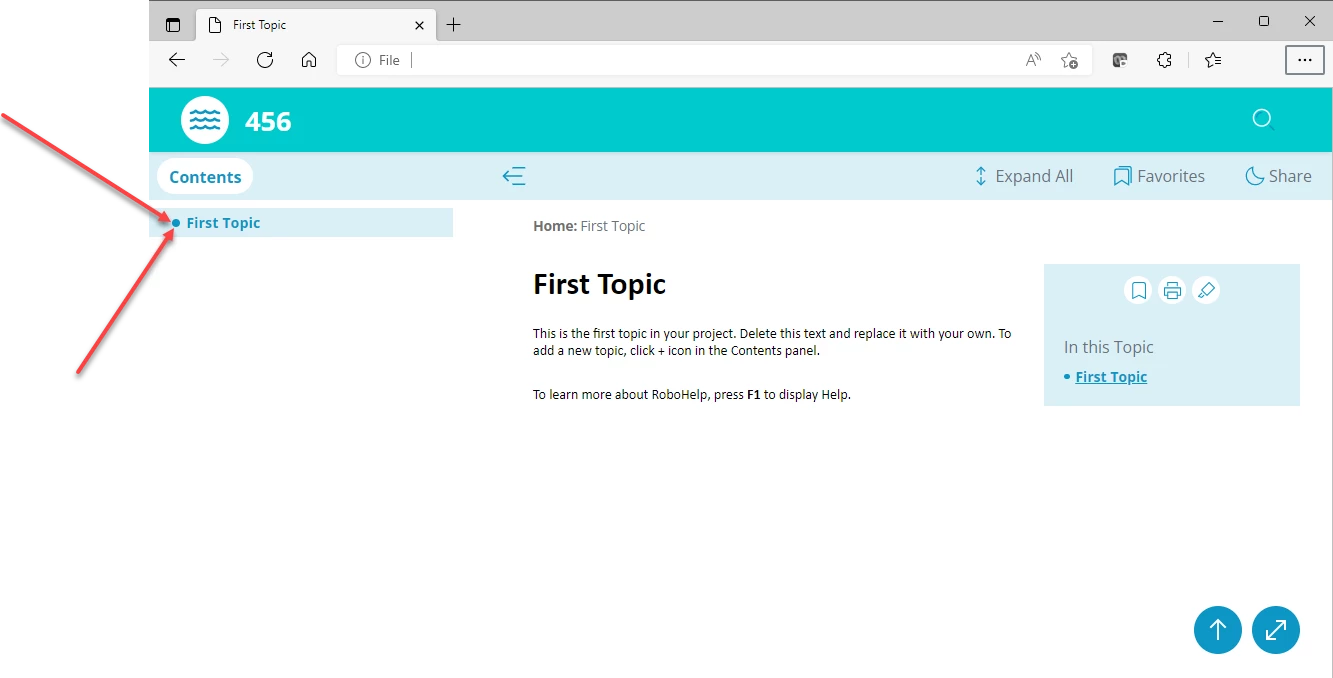
Using RH 2020.8.34. I want to get rid of the bullet that's visible when you clicked on a topic on the TOC of Oceanic skin. I tried to search for it everywhere within the skin, but can't seem to find it. How do I get rid of the bullet? Here's a screenshot of the bullet I want to get rid of:
    This topic has been closed for replies.
    Correct answer Amebr

    In 2019 New UI it looks like it's controlled by Left Panel > selected-icon, but the display is buggy in that version and it uses complicated css (that isn't available in the UI) rather than an image. I don't have RH2020 to check what options are available, so some of them might show up in the newer version.


    You could try setting the Background > Shading colour to the same blue as the paragraph shading to hide the circle. Look for that colour in the Left Panel > tab-box settings (or something similar).

    2 replies

    Peter Grainge
    Community Expert
    Community Expert
    November 4, 2022

    Try setting Display to None.

    ________________________________________________________

    My site www.grainge.org includes many free Authoring and RoboHelp resources that may be of help.


    Use the menu (bottom right) to mark the Best Answer or Highlight particularly useful replies. Found the answer elsewhere? Share it here.
    Sleant
    SleantAuthor
    Inspiring
    November 4, 2022

    Thank you so much, Peter. I didn't try it, but that's very good to know about "Display > none". Thank you.

    AmebrCommunity ExpertCorrect answer
    Community Expert
    November 3, 2022

    In 2019 New UI it looks like it's controlled by Left Panel > selected-icon, but the display is buggy in that version and it uses complicated css (that isn't available in the UI) rather than an image. I don't have RH2020 to check what options are available, so some of them might show up in the newer version.


    You could try setting the Background > Shading colour to the same blue as the paragraph shading to hide the circle. Look for that colour in the Left Panel > tab-box settings (or something similar).

    Sleant
    SleantAuthor
    Inspiring
    November 4, 2022

    You're the best! I even talked about you and Peter at our company :).