


GitHub connection with project - No option to push or commit etc
I am currently having an issue when using the ‘Collaboration’ feature within RoboHelp 2020.3.32. My colleague has set up the GitHub connection from his application and managed to create the first commit. He is able to then pull down the project and has some options available to ‘Push’, ‘Pull’, ‘Commit’ and more.
However, I have completed the exact same steps to pull the project down and have managed to obtain a copy of the project, but I am unable to then push any changes back up. I seem to not have the same options as my colleague has ( Pull, Push, Commit, etc ). These are the options I have when attempting to use the collaboration feature: ( see image below )
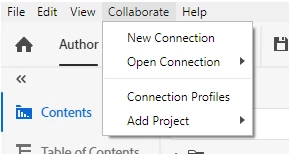
I have followed every step correctly using the Collaborate using GitHub (adobe.com) website help page and I am unable to get this working. Is there anything I might have missed out? More info below:
- I am using the latest version of: RoboHelp 2020 ( RoboHelp 2020.3.32 )
- I am using: git version 2.29.2.windows.2
Thanks in advance for any support.
 AdChoices