


Inspiring
April 8, 2022
Answered

Glossary term - Output appearance

  • April 8, 2022
  • 2 replies
  • 545 views

Hi Team,

I'm working RH 2020 and using frameless output for all my contents. I use glossary term feature for definitions and I have a query on the output of glossary.

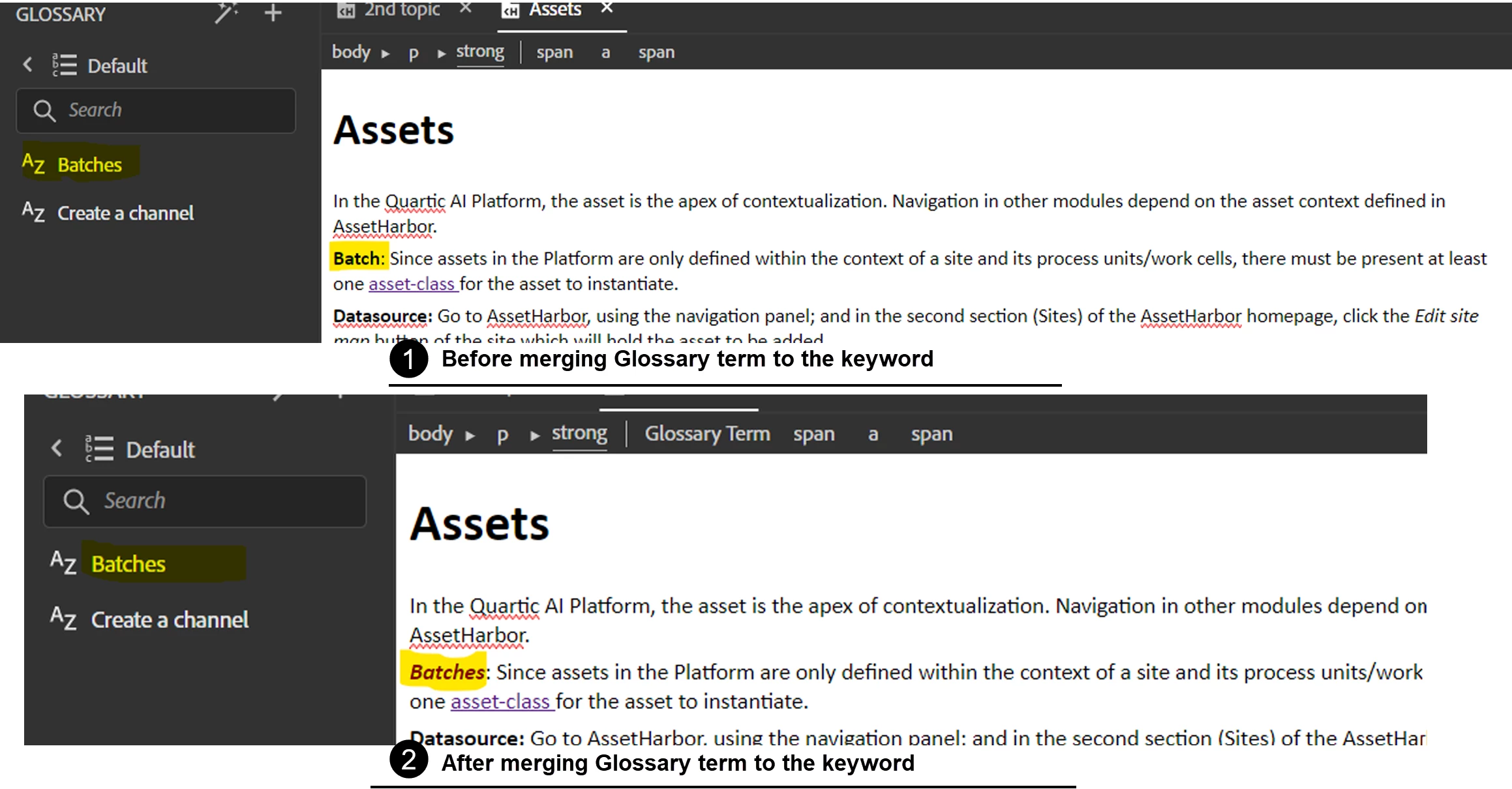
For ex: I have a glossary Batches and I have given the definition and added the glossary term into my content. But in my content I have a keyword as Batch. So when I merge the glossary term with the content, the keyword Batch changes to Batches. So is there any way to make the remain the same even after merging the glossary term to the particular keyword.


Apologize for this huge para. Could someone please help me with this?
I have attached a screenshot for reference purposes.

Thanks in advance,

Avinash S
 

    This topic has been closed for replies.
    Correct answer Amebr

    I just tried in test project in Classic and the behaviour is the same (applying a glossary term changes the word to match the glossary term). It doesn't really help, beyond confirming the behaviour hasn't changed, at least. 🙂


    You can request features and report issues here: https://tracker.adobe.com/
    Post the item number in the discussion so people can easily vote if they want the same functionality.

    2 replies

    AmebrCommunity ExpertCorrect answer
    Community Expert
    April 11, 2022

    I just tried in test project in Classic and the behaviour is the same (applying a glossary term changes the word to match the glossary term). It doesn't really help, beyond confirming the behaviour hasn't changed, at least. 🙂


    You can request features and report issues here: https://tracker.adobe.com/
    Post the item number in the discussion so people can easily vote if they want the same functionality.

    Inspiring
    April 12, 2022

    Hi Amber,

    Thanks for helping me out this time too. I'll request for a new feature.


    Thanks,

    Avinash S

    Jeff_Coatsworth
    Community Expert
    Community Expert
    April 8, 2022

    Is the actual word "Batch" changed in the topic? Or is it just finding "batch" and thinking you want to see "batches" in your glossary search?

    Inspiring
    April 8, 2022

    "Batch" is the word I used in the content and "Batches" is the glossary term. So when I merged the glossary term into the content, the keyword "Batch" changed into "Batches" and this changing results in changing the content too.

    So my query here is If I merge a glossary term to a keyword in the content, it will the keyword remains the same or it will be changed accordingly to the glossary term we are merging?

    Jeff_Coatsworth
    Community Expert
    Community Expert
    April 8, 2022

    I'm unsure of the concept of "merging" a glossary term - I thought you just defined them and the tool just went around and marked up any "hit" that matched it. I guess you could just go back into your topic and strip out the glossary coding around "Batch". Is your version of RH2020 up to date (Patch 7 as of Apr 2022)? Maybe something in the process has changed.