Inspiring
December 14, 2011
Answered

"Go" Button in Search Window

  • December 14, 2011
  • 2 replies
  • 528 views

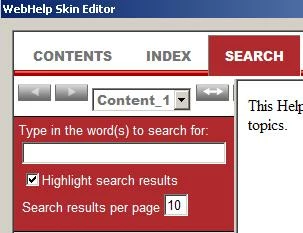
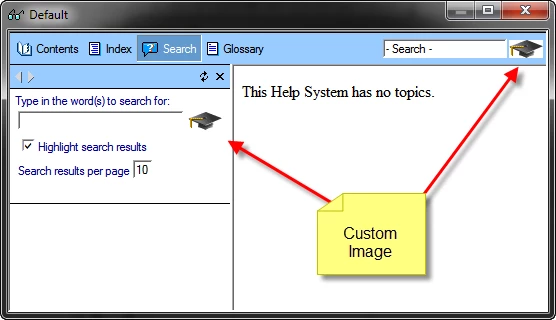
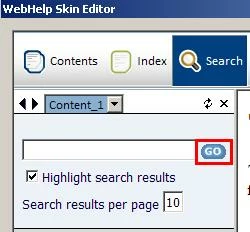
I created a new project with a different skin. I can't seem to locate where to go to attach the "Go" button to the search field in the search window. I've compared the WebHelp Skin Editor and the WebHelp Settings in the Single Source Layouts, and I'm not seeing what is different. Where is the field that lets me upload an image to that window?

Thank you!
    This topic is closed to new replies. Start a new post to keep the conversation going.
    Correct answer Captiv8r

    Hi there

    Open the WebHelp skin editor.

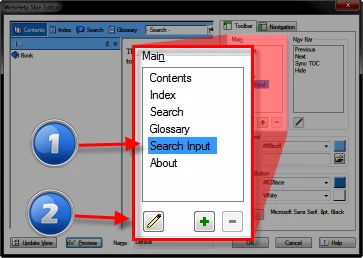
    Click the Search Input item followed by the pencil item.

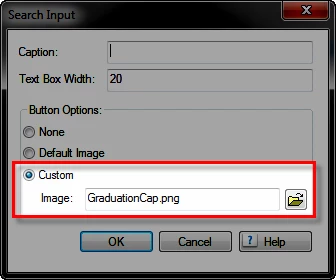
    Choose Custom from the dialog and set the image you want.

    Cheers... Rick

    Helpful and Handy Links

    RoboHelp Wish Form/Bug Reporting Form

    Begin learning RoboHelp HTML 7, 8 or 9 within the day!

    Adobe Certified RoboHelp HTML Training

    SorcerStone Blog

    RoboHelp eBooks

    2 replies

    Captiv8r
    Captiv8rCorrect answer
    Legend
    December 14, 2011

    Hi there

    Open the WebHelp skin editor.

    Click the Search Input item followed by the pencil item.

    Choose Custom from the dialog and set the image you want.

    Cheers... Rick

    Helpful and Handy Links

    RoboHelp Wish Form/Bug Reporting Form

    Begin learning RoboHelp HTML 7, 8 or 9 within the day!

    Adobe Certified RoboHelp HTML Training

    SorcerStone Blog

    RoboHelp eBooks

    Inspiring
    December 14, 2011

    That worked! Thank you!