
Participating Frequently
December 2, 2023
Question

Graphics/arrows from FrameMaker 2022 can't display in Microsoft HTML Help output in Robohelp 2022

  • December 2, 2023
  • 4 replies
  • 482 views

Hello Robohelp Experts,

I have this graphic display issue from FrameMaker 2022 to Microsoft HTML (chm) output in RH 2022.

The graphics in the FrameMaker file are in a Anchored Frame. In the anchored frame, there are text boxes, lines, arrows and graphics (in jpg format). See below 1st pic in framemaker.
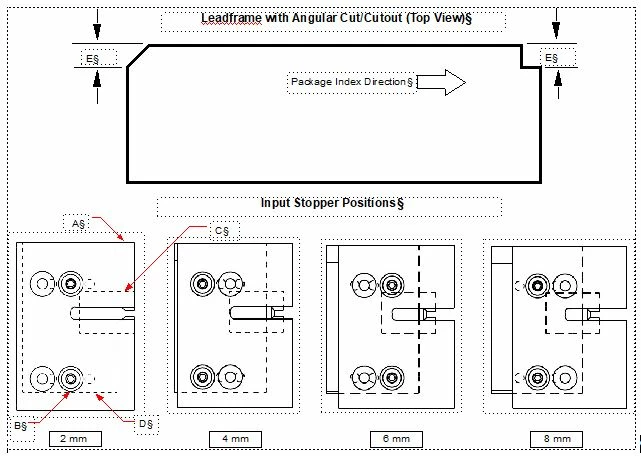
 

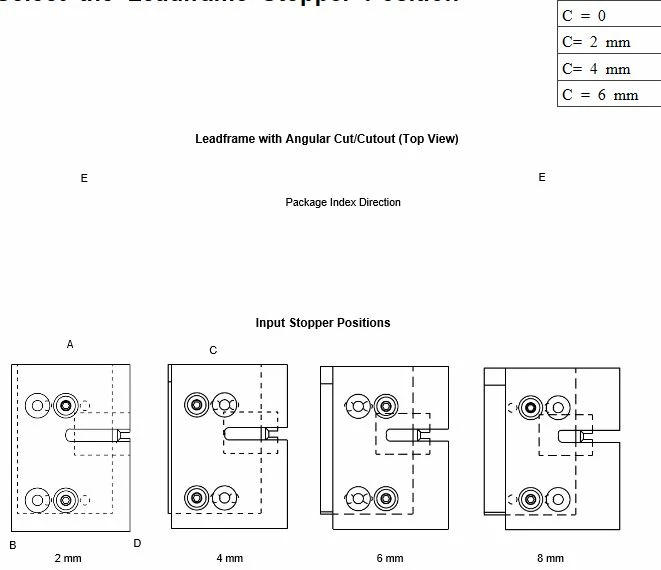
When i build my book in Microsoft HTML (chm) in Robohelp 2022, The some graphics, arrows and lines did not appear. See below 2nd pic.
 

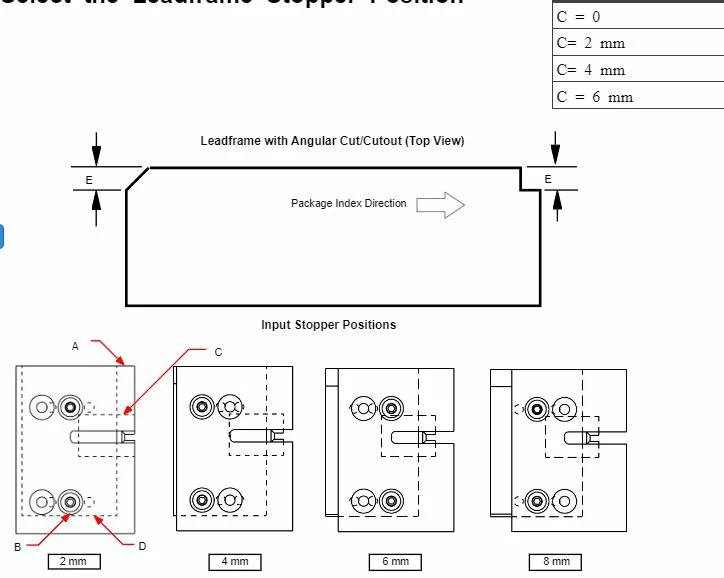
However, when i build my book in ResponsiveHTML, the graphics, lines and arrows appear same as the FrameMaker file. See belwo 3rd pic.
 

May i know how do i get the graphic, lines and arrows appear in the Microsoft HTML (chm) output?

Is there a setting in the chm output that I missed out? Pls help! 


    This topic has been closed for replies.

    4 replies

    Jeff_Coatsworth
    Community Expert
    Community Expert
    December 4, 2023

    Are you importing or linking the FM content to your RH project? Is RH2022 up to date with the last patch (3)? As an experiment have you tried publishing to CHM in FM? 

    Community Expert
    December 3, 2023

    Extendscript is no longer in RH2019 New UI and newer. Instead it's an undocumented mishmash of javascript libraries. 🙂


    There is an out of date pdf of Robohelp specific javascript functions in the Appendix of the online help, in case that helps.

    frameexpert
    Community Expert
    Community Expert
    December 2, 2023

    One process I have done in the past to make "composite" FrameMaker graphics into web images:


    1. Programmatically convert each image into a PDF and substitute it into the anchored frame.
    2. Use Acrobat Pro to convert each PDF image into a PNG.
    3. Programmatically replace each PDF image in the FrameMaker document with the corresponding PNG.


    It sounds complicated, but we used ExtendScript for steps 1 and 3 and processed hundreds of documents this way.

    Jac_NeoAuthor
    Participating Frequently
    December 3, 2023

    I am clueless on the ExtendScript program. I need to study on this program. Currently, I am replacing the images (extracted from pdf) manually in FM. 

    Thank You so much.

    frameexpert
    Community Expert
    Community Expert
    December 3, 2023

    ExtendScript is Adobe's version of Javascript that is built into FrameMaker. I believe that ExtendScript is built into Robohelp as well.

    Peter Grainge
    Community Expert
    Community Expert
    December 2, 2023

    Is this something that worked in earlier versions of RoboHelp but not in the new UI? My guess is that it has not worked before as I suspect it is simply something the Microsoft Compiler cannot handle. Microsoft last updated it in 2004 and CHMs are now a legacy output. They only work on the user's desktop and cannot run on a network.


    On Monday there will be someone else on the forum who may be able to add something but meantime the only solution I can think of is to create single images (png or jpg) and use different build tags on those and what is in your topics at the moment. A single image would work in a CHM.


    Both HTML5 Responsive outputs and Frameless outputs can be installed locally if you can consider alternatives. Frameless is the recommended option as that is where future development is focussed.

    ________________________________________________________

    My site www.grainge.org includes many free Authoring and RoboHelp resources that may be of help.


    Use menu (bottom right) to mark as Best Answer or to Highlight particularly useful replies. Found the answer elsewhere? Share it here.
    Jac_NeoAuthor
    Participating Frequently
    December 3, 2023

    Hi Peter, 

    Thank you so much for the advice. 

    Yes, for ealier version of RoboHelp, Chm was able to generate without any lines, arrows and graphic issue.  I

    Peter Grainge
    Community Expert
    Community Expert
    December 3, 2023

    Was it was working in the same update of 2022 or an earlier version and has now broken? When exactly did the break occur?


    I am guessing it is since you went to a new version or at least since applying an update to 2022. If so, it is a break in an upgrade and will get higher priority for fixing. Let me know please.


    Is changing the output type an option?

    ________________________________________________________

    My site www.grainge.org includes many free Authoring and RoboHelp resources that may be of help.


    Use menu (bottom right) to mark as Best Answer or to Highlight particularly useful replies. Found the answer elsewhere? Share it here.