



Graphics corrupted after customized frameless skin
Hello,
again a bug or my fault? RoboHelp 2020, v8, Frameless, Studio skin
When customizing graphics e.g. logo or the graphic in the top area via the skin editor, the graphics are visible in the editor but do not show up in the published output. This happens also with the close button (X) in the mobile view when opening the hamburger menu (on the the top right).
After havng a closer look at the css files I figured out, that the layoutDiff.css shows corrupted urls as soon as I change something in the skin editor and save it. See following example:
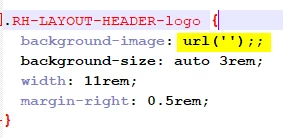
As soon as I repair the path in the css manually and save it, everythings works well.
It seems that also other elements in the css are corrupted and for examples showing multiple semicolons or duplicated parameters:

Has anyone experienced the same issues? Do you know the reason for that?
In earlier RH version, e.g. RH2017 we learned, that editing a skin via the network and not locally on the PC will corrupt the Master.xml heavily, thus it could not be used any longer (several lines at the end of the file were deleted completed).
Thanks for you help
Steffen
 AdChoices