Inspiring
October 22, 2024
Answered

Have heading continue (running heading)

  • October 22, 2024
  • 7 replies
  • 814 views

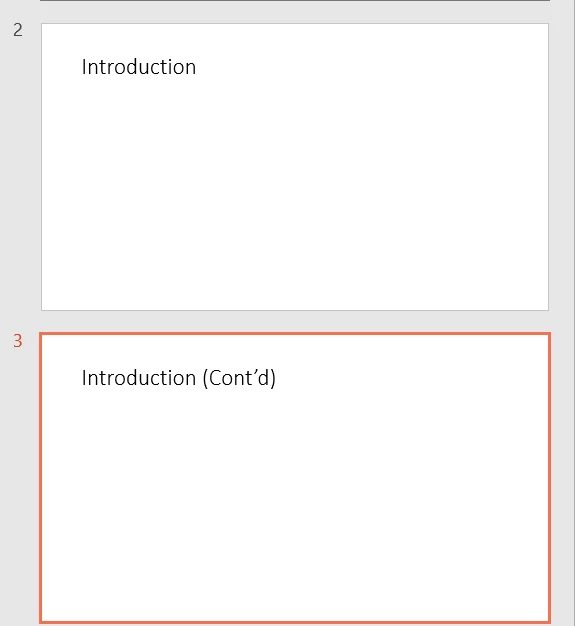
Is there a way to get a heading to continue (and say "cont'd") to the next page if the content is to long in a topic.  I would want it like this example below.


    This topic has been closed for replies.
    Correct answer Peter Grainge

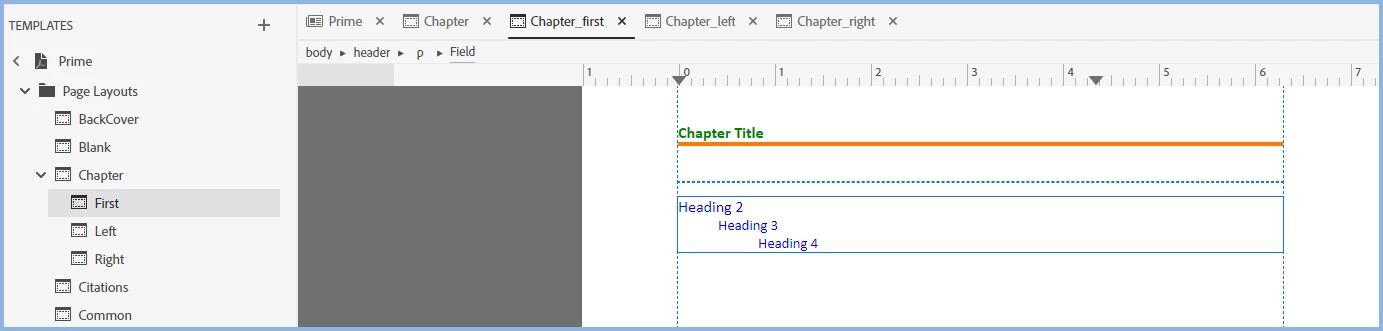
    Open page layouts and it becomes obvious.


    The first page opens with Chapter Title.


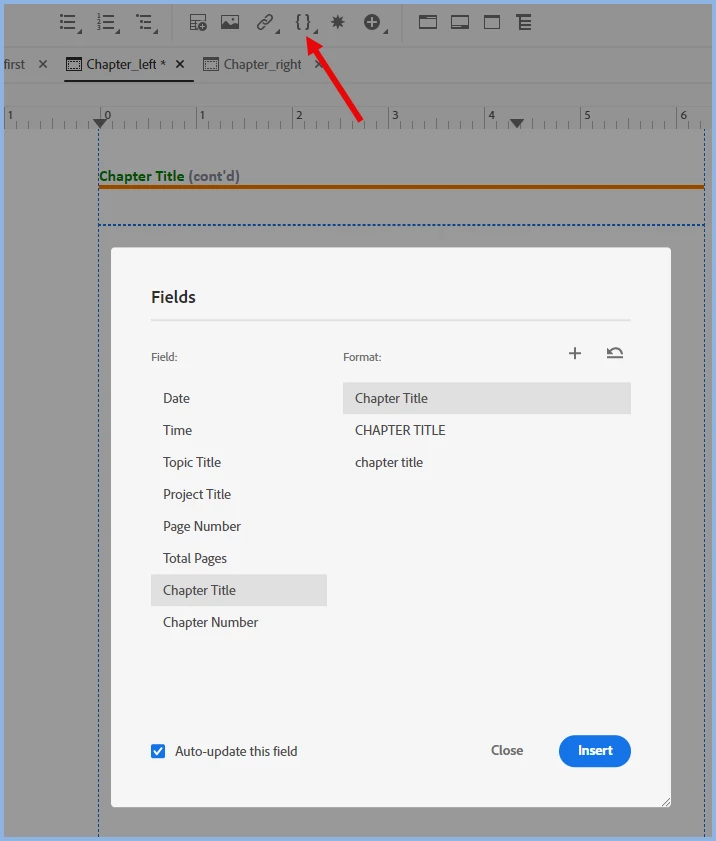
    You edit it how you want. Click the icon to open the dialog with options.


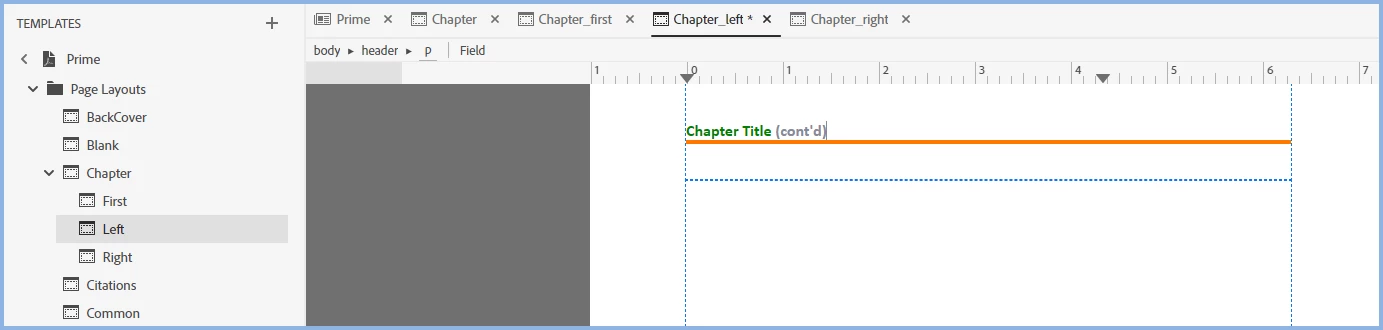
    You can add text as I have done here. Do the same for the right hand pages.

    ________________________________________________________

    My site www.grainge.org includes many free Authoring and RoboHelp resources that may be of help.


    7 replies

    Peter Grainge
    Community Expert
    Peter GraingeCommunity ExpertCorrect answer
    Community Expert
    October 23, 2024

    Open page layouts and it becomes obvious.


    The first page opens with Chapter Title.


    You edit it how you want. Click the icon to open the dialog with options.


    You can add text as I have done here. Do the same for the right hand pages.

    ________________________________________________________

    My site www.grainge.org includes many free Authoring and RoboHelp resources that may be of help.


    Use menu (bottom right) to mark as Best Answer or to Highlight particularly useful replies. Found the answer elsewhere? Share it here.
    Inspiring
    October 23, 2024

    Thank you!!! This is what I was looking to do.

    Peter Grainge
    Community Expert
    Community Expert
    October 23, 2024

    The Prime PDF template allows you to define the first page of the Chapters differently from the rest. Add (Cont'd) to the left and right pages. 


    Apologies for the mix-up over tables.


    ________________________________________________________

    My site www.grainge.org includes many free Authoring and RoboHelp resources that may be of help.


    Use menu (bottom right) to mark as Best Answer or to Highlight particularly useful replies. Found the answer elsewhere? Share it here.
    Inspiring
    October 23, 2024

    Thank you Peter! This is really close to what I'm looking for. Do you think there is a way to get the topic heading to be "Introduction cont'd"? I'm guessing that may require some kind of scripting? I would want the left/right layout variants to take the heading from the first layout variant and add the word cont'd.

    Peter Grainge
    Community Expert
    Community Expert
    October 22, 2024

    I got a chance to look and, with apologies, it is tables only.


    I'll see if I can find anything in the morning but I think the answer will be negative.

    ________________________________________________________

    My site www.grainge.org includes many free Authoring and RoboHelp resources that may be of help.


    Use menu (bottom right) to mark as Best Answer or to Highlight particularly useful replies. Found the answer elsewhere? Share it here.
    Peter Grainge
    Community Expert
    Community Expert
    October 22, 2024

    It will not apply to headings, that's why I said it's not what you want.


    Without checking and I'm not at a RoboHelp machine, I'm not sure. If you deselect the tables check box, are those fields disabled? If they are, it's tables only. Otherwise it could be an either or setup. 


    Try it. 


    Post back and I'll look in the morning. 

    ________________________________________________________
    My site www.grainge.org includes many free Authoring and RoboHelp resources that may be of help.


    Use menu (bottom right) to mark as Best Answer or to Highlight particularly useful replies. Found the answer elsewhere? Share it here.
    Peter Grainge
    Community Expert
    Community Expert
    October 22, 2024

    It's not quite what you want but I think this is about as close as you will get.


    Please always start a thread with the version of RoboHelp. See Help > About for the full version number.

    ________________________________________________________

    My site www.grainge.org includes many free Authoring and RoboHelp resources that may be of help.


    Use menu (bottom right) to mark as Best Answer or to Highlight particularly useful replies. Found the answer elsewhere? Share it here.
    Inspiring
    October 22, 2024

    That will only apply to Tables, right? It won't apply to headings?

    Peter Grainge
    Community Expert
    Community Expert
    October 22, 2024

    In what output? 

    ________________________________________________________
    My site www.grainge.org includes many free Authoring and RoboHelp resources that may be of help.


    Use menu (bottom right) to mark as Best Answer or to Highlight particularly useful replies. Found the answer elsewhere? Share it here.
    Inspiring
    October 22, 2024

    PDF output

    Peter Grainge
    Community Expert
    Community Expert
    October 22, 2024

    Is this question related to Adobe's RoboHelp product? If so, which version? We will need more context. 


    If not related, you are asking in the wrong forum.

    ________________________________________________________
    My site www.grainge.org includes many free Authoring and RoboHelp resources that may be of help.


    Use menu (bottom right) to mark as Best Answer or to Highlight particularly useful replies. Found the answer elsewhere? Share it here.
    Inspiring
    October 22, 2024

    Yes, it is related to Robohelp 2022. I'm wondering if this is a capability of Robohelp.