
Known Participant
December 15, 2015
Answered

Headings not rendering properly in Design View

  • December 15, 2015
  • 2 replies
  • 421 views

When using em or % sizes in CSS, the headings are not rendering properly in Design View (RH 2015).

This can be reproduced very easily: Create a new empty project, edit default.css and make the following settings:

h1, h2, h3, p {

    font-family: Arial;

    font-size: 100%;

}

Now headings 1, 2, 3, and paragraphs should all be displayed in the browser's default font size (normally 16px).

In the topic preview (and in all modern browsers), this is exactly the case:
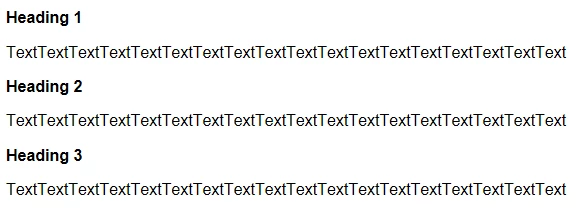
However, when looking at the same topic in Design View, all headings are displayed in different sizes, and all of them are too large:
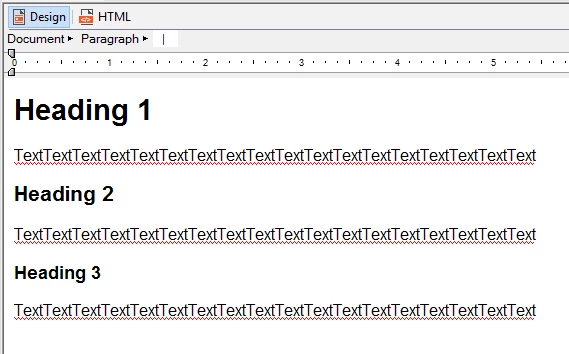
It seems that the Design View is ignoring the font-size % statement and uses fixed inherited sizes instead.

With 1em instead of 100%, the behaviour is exactly the same.

As a result, I am unable to use % or em sizes in my RH project because the headings appear in ridiculously blown up sizes. (In the example above, they don't, but normally you would use something like 180%, 150%, 120% for the headings).

This is very unpleasant, as using % or em is state-of-the-art for responsive design. Can you please fix this or provide a workaround? Using px sizes is not a workaround 😉

This topic has been closed for replies.
Correct answer Willam van Weelden

This a very annoying bug that has been around for years. Please log a bug report with Adobe: https://bugbase.adobe.com/

As a workaround, I use 2 CSS files. One with points that I use for working in RoboHelp. And one that I manually add to my output to overwrite the fixed size CSS. No easy fix I'm afraid.

2 replies

Jeff_Coatsworth
Community Expert
Community Expert
December 15, 2015

We all just ignore what it appears like in Design View because we know that’s NOT what it’s going to look like in our output.

Willam van Weelden
Willam van WeeldenCorrect answer
Inspiring
December 15, 2015

This a very annoying bug that has been around for years. Please log a bug report with Adobe: https://bugbase.adobe.com/

As a workaround, I use 2 CSS files. One with points that I use for working in RoboHelp. And one that I manually add to my output to overwrite the fixed size CSS. No easy fix I'm afraid.

Known Participant
December 15, 2015

Thanks, Willam. Reported as bug.

Using two CSS files is probably the best thing to do - I already have two files to keep RH from messing around with <pre> tags and stuff.

Known Participant
December 15, 2015

@Jeff: True, but it's hard to ignore huge ~80px headings when writing topics. I could do it all in HTML view, but not everyone in my department can.