
help..weird bug using a list in a table cell
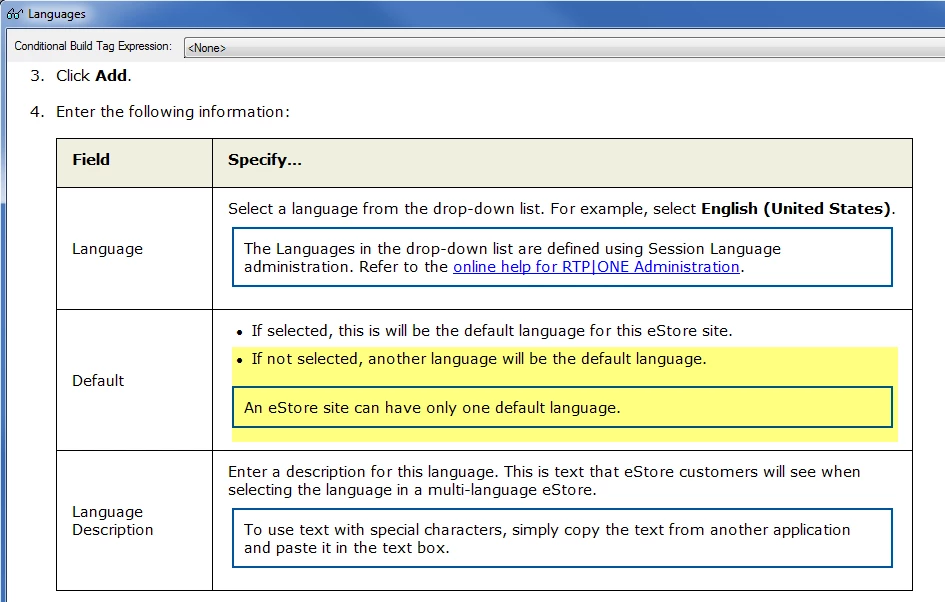
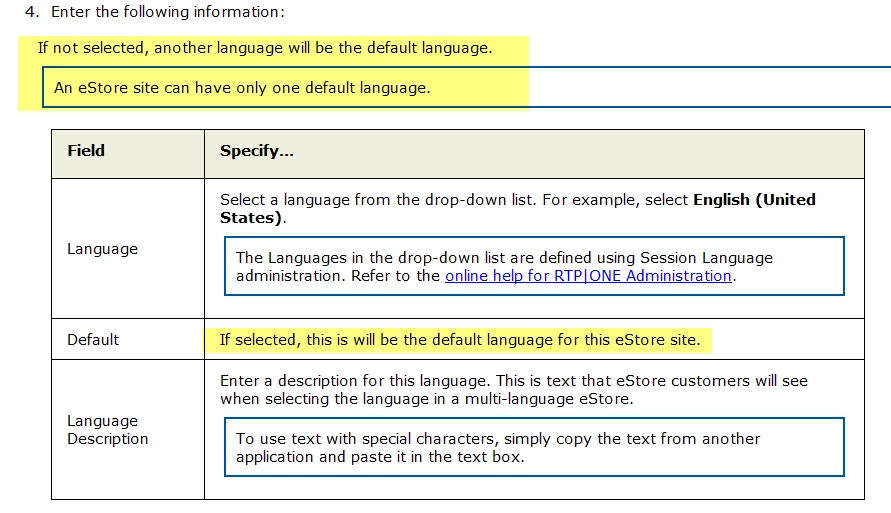
This has happened a couple of times now and I can't figure out why. Below are two screen shots of a page created in RH8. The first screen shot is from within RH when I clicked View Item. Notice that the second row of the table includes a bulleted list and a note inside a box, which is also how it looks when I edit the topic. The second screen shot is from the generated WebHelp. The second bullet and the note now appear ABOVE the table.
The HTML for the table is pasted below the screen shots. Can anyone help me figure out what's wrong?
<table class="TableRTP" cellspacing="0">
<tr class="t1st">
<td><p class="tableheading">Field</p></td>
<td><p class="tableheading">Specify…</p></td>
</tr>
<tr class="t2Row">
<td><p class="tabletext">Language</p></td>
<td><p class="TableText">Select a language from the drop-down
list. For example, select <span style="font-weight: bold;">English
(United States)</span>.</p>
<p class="tableNote">The Languages in the drop-down list are
defined using Session Language administration. Refer to the
<a href="../../RTPOneAdministrationUsersGuide/SystemAdministration/SystemManagement/sessionlanguage.htm"
target="_blank" id="a1">online help for RTP|ONE Administration</a>.</p></td>
</tr>
<tr class="t1Row">
<td><p class="tabletext">Default</p></td>
<td><ul type="disc">
<li class="p-TableText"><p class="TableText">If selected,
this is will be the default language for this eStore site.</p></li>
<li class="p-TableText"><p class="TableText">If not selected,
another language will be the default language.</p></li>
</ul>
<p class="tableNote">An eStore site can have only one default
language.</p></td>
</tr>
<tr class="t2Row">
<td><p class="tabletext">Language Description</p></td>
<td><p class="TableText">Enter a description for this language.
This is text that eStore customers will see when selecting
the language in a multi-language eStore.</p>
<p class="tableNote">To use text with special characters, simply
copy the text from another application and paste it in the
text box.</p></td>
</tr>
</table>


 AdChoices