Karin Albrecht 2
Known Participant
May 26, 2026
Answered

Help with adjustment of search bar in Frameless template

  • May 26, 2026
  • 5 replies
  • 23 views

Hi All,

I could use a little help with my frameless template. I created it based on the Orange skin and adjusted it to my company’s CI. However, the search bar is displayed within the title of my help. I cannot find the setting I have to adjust to move the search bar more to the right. 

Any ideas what I have to change?

Thank you,

Karin

    Correct answer Peter Grainge

    I think this is what you want.

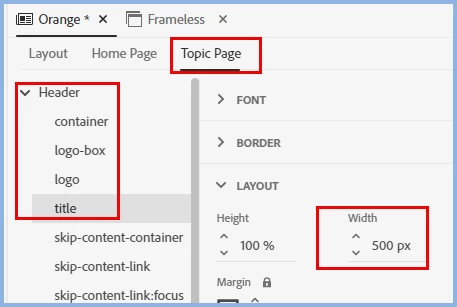
    Change the Topic Page > Header > Title width to what you need for your title.

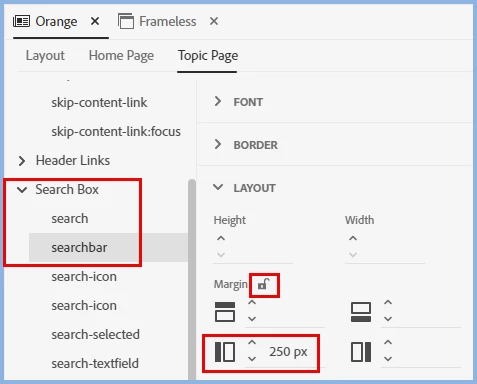
    Then change the left margin for the search bar

    Your measurements will vary but these are the settings to get what you want.


    My site www.grainge.org includes many free Authoring and RoboHelp resources that may be of help.

    5 replies

    Karin Albrecht 2
    Known Participant
    May 27, 2026

    Perfect, thank you both! I had adjusted the width of my title section, but not the margin of the search box. Now it looks fine :)

    Peter Grainge
    Community Expert
    Peter GraingeCommunity ExpertCorrect answer
    Community Expert
    May 27, 2026

    I think this is what you want.

    Change the Topic Page > Header > Title width to what you need for your title.

    Then change the left margin for the search bar

    Your measurements will vary but these are the settings to get what you want.


    My site www.grainge.org includes many free Authoring and RoboHelp resources that may be of help.

    Use the menu (bottom right) to mark the Best Answer or Highlight particularly useful replies. Found the answer elsewhere? Share it here.
    Peter Grainge
    Community Expert
    Community Expert
    May 27, 2026

    @Karin Albrecht 2 This can be done in the template editor so that there is no overlap regardless of screen size. I will take a look, hopefully later today.


    My site www.grainge.org includes many free Authoring and RoboHelp resources that may be of help.

    Use the menu (bottom right) to mark the Best Answer or Highlight particularly useful replies. Found the answer elsewhere? Share it here.
    Karin Albrecht 2
    Known Participant
    May 26, 2026

    Yes, the size of the search box changes when I drag the screen smaller.

    Jeff_Coatsworth
    Community Expert
    Community Expert
    May 26, 2026

    Sorry, I meant - do the search fields get out of the way when you resize the screen larger? i.e. does the screen resolution have an impact on scrunching the elements together or spacing them out? 
    Are you only having the issue when the screen size is very small?

    Karin Albrecht 2
    Known Participant
    May 27, 2026

    I hope I got you right this time :) This happens in full screen. So, in general, the search bar has more than enough space available. When dragging the screen smaller, the search box gets smaller as well and at some point in time, the title and logo is hidden to the left and only the search bar shows. 

    I made a screenshot of my full screen this time.


    Jeff_Coatsworth
    Community Expert
    Community Expert
    May 26, 2026

    Does it change depending on the screen resolution at all?