
Known Participant
July 21, 2016
Question

HHC3004: Warning: with invalid HTML tags and then CHM file will not open

  • July 21, 2016
  • 4 replies
  • 5410 views

I am using RH HTML in version RH11.

I am getting the following, multiple warning messages when compiling the CHM file and the file will not open.

HHC3004: Warning:

TopicName.htm :

The HTML tag "?xml version="1.0" encoding="utf-8" ?" is not a valid HTML tag (it does not begin with an alphanumeric character).

Here are the strange things...

I am generating using 3 conditional build tags.  It is successful using any of the tags individually, or any 2 of the tags.  Just not all three.

    

I am able to generate with 3 build tags, the first 2 of the 3 above and one other one.

Each time I generate using the same settings (the 3 tags), the warning is applied to different topics.  Some topics that had the warning before, don't in the next iteration.

The CHM generates, but the file is double the size of the successful attempts.  64MB vs 32MB.
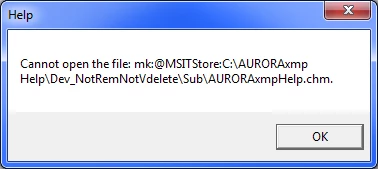
    

Other info:

Working and generating on a single machine.

This worked fine 6/24/2016 with all the exact same settings, the last time I did a build of my CHM.

This topic has been closed for replies.

4 replies

AURORAxmpAuthor
Known Participant
August 19, 2016

So this has become nonsensical.  I have identified the offending topic, and it actually comes down to one image. 

  • When I mark the image with one of the tags that I am NOT including in the build, it fails.  Doesn't matter which of the three tags I use.  Note that there are hyperlink texts on the page also marked with these tags that succeed.
  • When I leave the image unmarked, or mark with a tag that IS included in the build, it succeeds.
  • When I try to delete the image (I don't really need it anymore), it fails!!  I have tried deleting in Design and HTML view.
  • I can move the image around on the page and it is fine, but the minute I delete or tag for removal, it fails.

I don't see anything in the HTML code that would cause a problem, although I am not HTML savvy.

What else can I do?  Is there an Adobe person I can speak to?  I need to be able to create a CHM without this image.  Again, one week ago this all worked fine.  The only change to this topic was to add text/hyperlink.  I did not change anything that had to do with this image or the tags.

Peter Grainge
Community Expert
Community Expert
August 21, 2016

Does this help? Build Expressions


See www.grainge.org for RoboHelp and Authoring information

@petergrainge

Use the menu (bottom right) to mark the Best Answer or Highlight particularly useful replies. Found the answer elsewhere? Share it here.
AURORAxmpAuthor
Known Participant
August 22, 2016

No, but thank you.  I did learn a little more about advanced tag references and the 'OR' statement. 

This topic has worked just fine with my tags for over 9 months.  The only thing recently changed in this topic was that I added a text/hyperlink (untagged) elsewhere in the topic.  By trial and error removing and reapplying the tags, it has come down to this one image.  (The exact same tag is excluded just fine when applied to text/hyperlink elsewhere in the topic.)  When this image is tagged or deleted, the build doesn't work (builds, but file doubles in size and can't open).  When I remove the tag from the image, the build works.

It is imperative that I remove this image from all builds going forward.  We have an application release coming up and I have to have my work complete at the end of the week!!

AURORAxmpAuthor
Known Participant
August 18, 2016

Okay...the issue is back.  I have only touched 20 topics (plus some TOC work) since my last successful build.

Any 2 of the 3 tags I need, builds.  All 3, fail.  All 3 plus one, builds.  Here is a representation of what is happening.  Highlighted cells show build options.

It makes no sense.

prhmusic2

You mentioned going through the topics one-by-one.  I did create a new project and imported the 20 topics I have touched since last successful build one-by-one and the builds were successful.  But that dummy project did not have the TOC or other linked topics in it.  Nor did I have the full structure of my current project.  What should I be looking for in the html code??

Peter Grainge
Community Expert
Community Expert
August 19, 2016

Re the second image in your first post, see if Item 6 at Snippets helps.


See www.grainge.org for RoboHelp and Authoring information

@petergrainge

Use the menu (bottom right) to mark the Best Answer or Highlight particularly useful replies. Found the answer elsewhere? Share it here.
AURORAxmpAuthor
Known Participant
August 19, 2016

Thank you for the reply Peter.  So, nothing has changed since my last successful build.  In fact I hadn't even closed RoboHelp.  Seems like it couldn't be a dll issue.  Thoughts?

I tried renaming the hh.dat and that did not help either.

I'm not sure I completely understand "name of the directory containing the .chm files".  Does that mean the path/folder I am using to define the location of the chm?  Again, nothing has changed there, I don't see any non-English or special characters, and it works fine for other builds, just not the ones excluding the tags I don't need.

AURORAxmpAuthor
Known Participant
July 22, 2016

Very strange.  The issue has suddenly corrected itself.  I played a little with the conditional build tags applied to the very last topic I had touched.  Suddenly, even back with the original tag, it is completing the build and I am able to open it.  Lucky it was a recent topic.  If it had been something else in the last month there would have been no way for me to touch all those topics again.

Inspiring
July 22, 2016

I have seen your error but it didn't prevent me from compiling. From years and years ago, my go-to source for all things CHM related is Rob @ Helpware.net. I actually asked him about this error in May 2016. To paraphrase, he wrote that he had seen the error before but it shouldn't impact the ability to compile - his email to me concluded with "It may be annoying but at least you know you can ignore it and won't affect the CHM output."

So, to me, I would probably rule out the actual CHM compiler. That leaves your HTML code.

I realize my tendencies for troubleshooting lean towards going overboard, but I usually have the most success when I isolate the issue. I would create a new page and generate an output with only that page with a copy of your code. I would one at a time see if you can pinpoint precisely what code is tripping up the compiler.

Because the CHM compiler hasn't been updated in years, you have to learn to play by its rules. It may not be able to handle something - usually unintentional - in your HTML code. I believe that because you wrote "Some topics that had the warning before, don't in the next iteration."  The compiler isn't "magic" - there is a reason you are seeing errors and the fact that it appears to be random makes it all the more frustrating!

AURORAxmpAuthor
Known Participant
July 22, 2016

Thank you for your reply.  I am not sure I understand your troubleshooting advice.  I'm not sure I need to create a new page since I am able to successfully compile with the project, just not with the 3 conditional build tags I want.  How does making a new topic isolate why removing topics with the 3 specific tags causes the problem?  Please explain further, as I am desperate for help.